-
 Hideo Kojima's Espionage Game Physint Changes Hands From PlayStation to Xbox After Sony Backs Out of Project11 September 2026
 -
Microsoft Will Put Monthly Cap on Xbox Cloud Gaming Hours for Game Pass Members in November4 September 2026
-
Microsoft Will Launch Disc-to-Digital Feature for Xbox Games Next Week27 August 2026
-
Xbox Series X25 Limited Edition Console Will Reportedly Cost EUR 899.99, Launch on November 2721 August 2026
-
Call of Duty Maker Activision Could Reportedly Help Develop Future Halo Games17 August 2026
Microsoft Teams Update Adds Workplace Check-In Feature That Detects Office Presence Using Wi-Fi
As per Microsoft, the new Workplace Check-In feature will remain under user control and will not be enabled by default.
Written by Shaurya Tomer, Edited by David Delima | Updated: 15 June 2026 15:25 IST
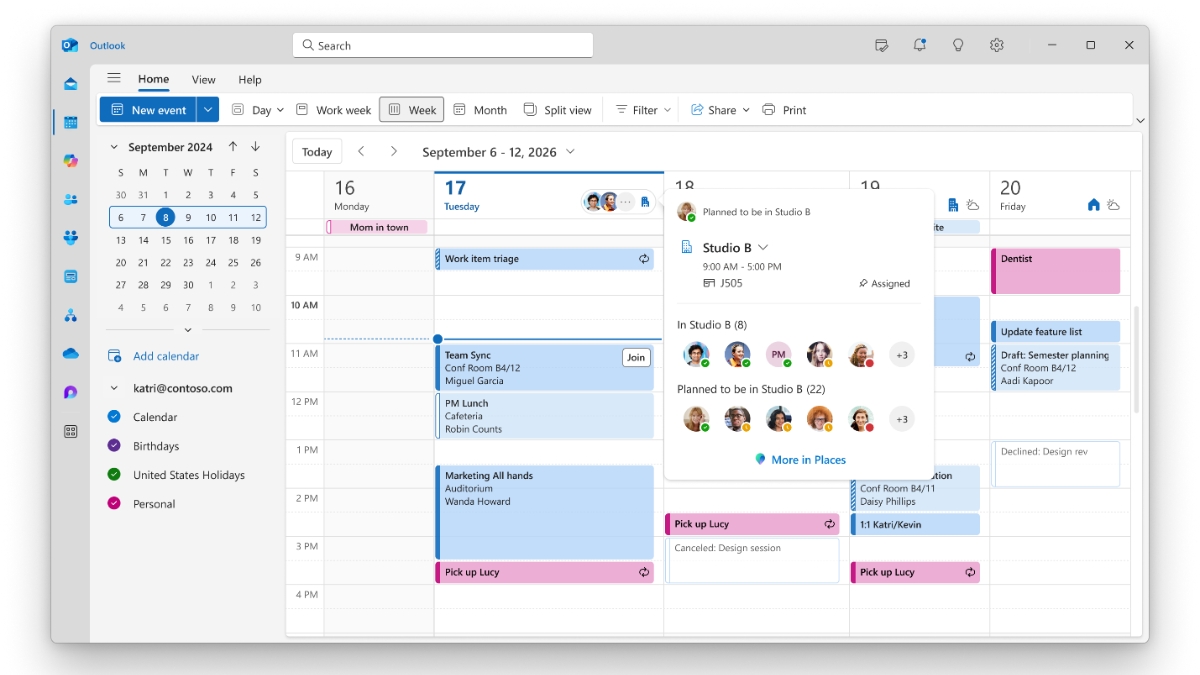
Photo Credit: Microsoft
Microsoft has emphasised that Workplace Check-In is not a real-time employee tracking system
Click Here to Add Gadgets360 As A Trusted Source

Advertisement
Microsoft is rolling out a new feature for Microsoft Teams that can automatically detect when employees are in the office. The company says that the Workplace Check-In feature works in tandem with Microsoft Places to detect the user's connection to a corporate Wi-Fi network. The capability, first spotted on Microsoft's roadmap last year, can automatically update a user's workplace location when they connect to approved office networks. As per Microsoft, the new feature will remain under user control and will not be enabled by default.
Microsoft Teams Workplace Check-In Uses Wi-Fi to Detect Office Presence
With the Workplace Check-In feature, Microsoft aims to simplify workplace coordination by keeping users' office location status updated automatically. In a blog post, the company said that it builds on existing Microsoft 365 signals such as Teams presence indicators and calendar availability.
When a device connects to a configured corporate Wi-Fi network, Microsoft Teams can detect whether an employee is working from a particular office location. Citing an example, the company explained that if an employee visits a specific office building and joins its approved wireless network, the app will automatically update their workplace location for the day. The process does not require any manual input.
Addressing concerns, the company emphasised that Workplace Check-In is not a real-time employee tracking system. As per Microsoft, it can neither track movement between floors, buildings, or locations over time, nor store historical location data. Instead, it only provides an in-the-moment signal that a user is present in a configured workplace location.
Microsoft noted that it only works within workplace environments where approved corporate Wi-Fi networks have been configured. A user's status will continue to show as remote outside of such locations. Further, users are claimed to maintain control even after Workplace Check-In is enabled.
There is an Inform mode within Teams, which notifies employees that the feature is available, further supported by a choice to disable it. Alternatively, the Ask mode is claimed to explicitly prompt users to grant permission before it begins working.
As per the company, Workplace Check-In can help employees coordinate in-person work more effectively. It is also claimed to automatically update an employee's work plan and check them into existing desk reservations when they arrive at the office.
Microsoft says the rollout will begin later this year for organisations using Microsoft Places.
How to Enable Workplace Check-In on Microsoft Teams
- Confirm that Microsoft Places is configured within the organisation's environment.
- Add office buildings and workplace information to the Places directory.
- Enable the Teams Work Location Detection policy.
- Configure approved corporate Wi-Fi BSSIDs within the Places directory.
- Decide whether employees will receive the feature as an opt-in or opt-out experience.
- Inform employees about how the feature works, what information it collects, and how they can manage their privacy settings.
Microsoft says the rollout will begin later this year for organisations using Microsoft Places.
Comments
Get your daily dose of tech news, reviews, and insights, in under 80 characters on Gadgets 360 Turbo. Connect with fellow tech lovers on our Forum. Follow us on X, Facebook, WhatsApp, Threads and Google News for instant updates. Catch all the action on our YouTube channel.
Further reading:
Microsoft, Microsoft Teams
Related Stories





Microsoft Teams Update Adds Workplace Check-In Feature That Detects Office Presence Using Wi-Fi


Advertisement
Follow Us




-
05:20
Samsung Galaxy Watch Ultra 2 Review: Is This the Best Android Smartwatch? -
07:01
Samsung Galaxy Z Fold 8 Review: Is This the Best Foldable Phone? -
06:39
Samsung Galaxy Z Fold8 Ultra Review: Cameras, Battery, Performance Tested -
04:33
[Sponsored] JBL Live 780NC: Great Sound, Perfect Comfort, Smart ANC & 80-Hour Battery -
12:04
[Partner Content] OPPO Reno16 Series Deep Dive: Built for Creators?
-
iPhone Duo के लिए ₹3 लाख का बजट नहीं है? ये 4 सस्ते फोल्डेबल फोन देखिए
-
सोशल मीडिया में छाया 80s AI Photo Trend, आप भी आजमाएं ये 5 Prompts
-
Motorola के 7000mAh बैटरी वाले फोन पर ₹4,500 तक की बचत
-
Motorola Edge 70 Neo भारत में लॉन्च होगा Snapdragon चिप, 6GB रैम के साथ, IP68, IP69 रेटिंग!
-
85km रेंज वाली नई इलेक्ट्रिक बाइक Trek Inbound+ लॉन्च, जानें कीमत
Advertisement
Popular on Gadgets
- Samsung Galaxy S26 Ultra
- Motorola Razr Fold
- ChatGPT
- OPPO Find N6
- Mobiles Under Rs. 40,000
- Vivo X300 Ultra
- Asus Zenbook S14
- iQOO 15
- Vivo X300 Pro
- Lenovo Yoga Slim 7i Aura Edition
- iQOO 15R
- Vivo X Fold 5
- Sony PlayStation 5
- HP OmniPad 12
- OnePlus Nord CE 6 Lite
- OnePlus Pad 4
- OPPO F33 Pro 5G
- Cryptocurrency
- HP OmniBook Ultra 14 (2026)
- iPhone 17
- Eureka Forbes AP 355 Room Air Purifier
- Latest Mobile Phones
- Compare Phones
Latest Gadgets
- iPhone Duo
- OPPO A7 Pro
- Huawei Mate XT 2 Ultimate Design
- Realme 16 Pro Harry Potter Edition
- Samsung Galaxy A07s
- Huawei Pura X View
- Tecno Camon Slim 5G
- iQOO Z11xa
- Acer Aspire G 3D 16
- Acer Swift Air 16 (2026)
- Infinix Xpad 30 Pro
- Lenovo Yoga Tab Gen 2
- Apple Watch Ultra 4
- Apple Watch Series 12
- Haier M70 Mini LED 65-inch
- Xiaomi TV FX Mini LED 65
- Acer Predator Atlas 8
- Asus ROG Ally
- Blue Star 1.5 Ton 5 Star Inverter Split AC (IE518ZNURS)
- Blue Star 2 Ton 3 Star Inverter Window AC (WIE324L)

- About Us
- Sitemaps
- Feedback
- Archives
- Contact Us
- RSS
- Advertise
- Career
- Privacy Policy
- Ethics
- Editorial Policy
- Terms & Conditions
- Complaint Redressal
Download Our Apps
Available in Hindi
© Copyright Red Pixels Ventures Limited 2026. All rights reserved.