-
 Telegram 13th Anniversary Update Brings Welcome Messages, Interactive Buttons, and More26 August 2026
 -
Telegram Users Could Get Personalised .gram Domains if ICANN Approves19 August 2026
-
Best Telegram Bots for Productivity You Can Use in India 202615 August 2026
-
Apple Briefly Took Down Telegram From App Store After a User ‘Planted’ Pornographic Content in a Public Chat5 August 2026
-
Telegram Gets New Rich Text Editor, Communities, and Ephemeral Bot Messages20 July 2026
Telegram App for Android Gets Liquid Glass-Inspired Redesign With Bottom Navigation Bar
The New Group menu on the Telegram app for Android is now accessible through a three-dot overflow menu.
Written by Nithya P Nair, Edited by David Delima | Updated: 9 February 2026 16:53 IST

Photo Credit: Unsplash/ Dina Solomin
Liquid Glass design was rolled out on Telegram for iOS in early January
Click Here to Add Gadgets360 As A Trusted Source

Advertisement
Telegram for iOS got the popular Liquid Glass design touch with transparent elements and refraction effects earlier this year. Now, the messaging company has released a major update for its Android app, introducing a refreshed design based on the same Liquid Glass styling. The update expands on visual changes first introduced late last year. It brings new design elements, including translucent panels and an updated hamburger menu. The latest update of Telegram for Andorid adds a new four-tab bottom navigation bar, resembling the design of the iOS version.
Telegram's Latest Android App Borrows Design Elements from iOS 26
Available to users who have updated to Telegram for Android version 12.4.0 via the Play Store, the update introduces a Liquid Glass-inspired look with transparent and modern visual elements across the app. As mentioned, the update includes a new four-tab bottom navigation bar that closely matches the layout used on iOS.
- Telegram vs X: Where Does the Crypto Community Belong?
- Telegram has rolled out new updates
- India blocks telegram app access till June 22 over Neet security concerns
- Generating flash usdt fot trading and gaming
- The Truth About Bitcoin Recovery Services HIRE META TECH RECOVERY PRO After a devastating hack that depleted my USDT ho
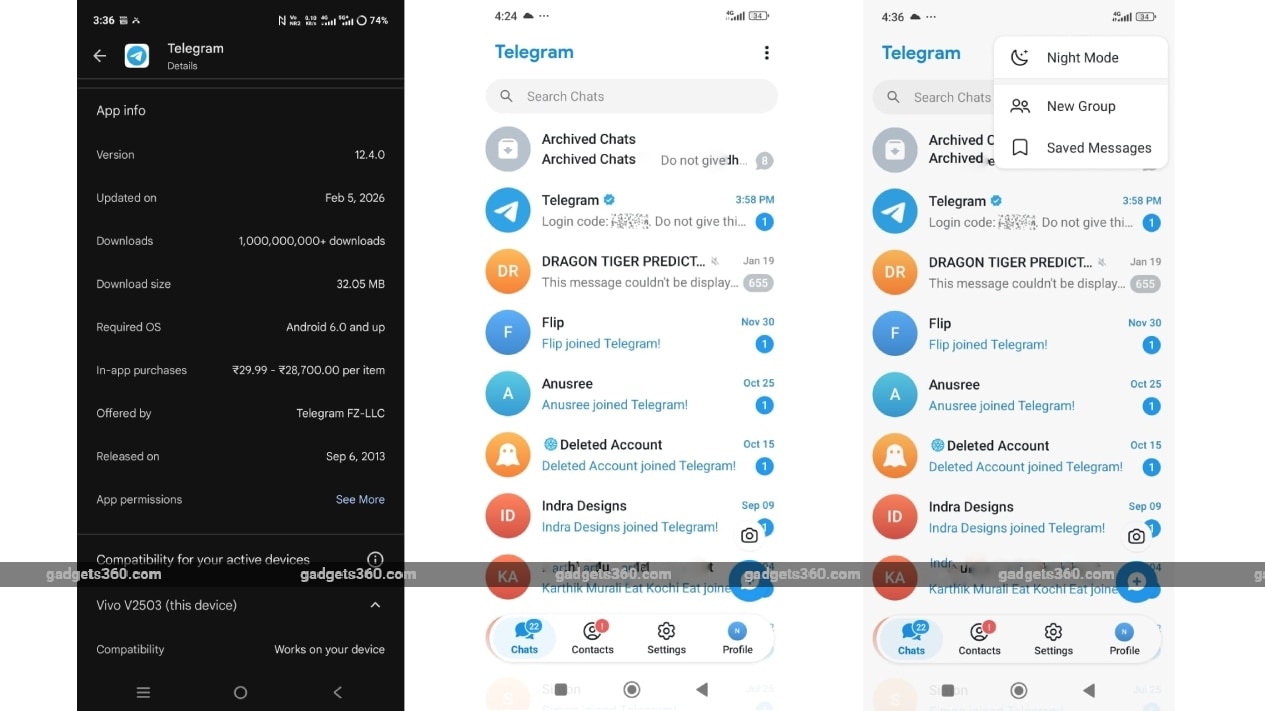
The navigation bar features four tabs — Chats, Contacts, Settings, and Profile. This bottom bar remains visible when we scroll through each section. Telegram has also removed the hamburger side menu entirely.
The New Group menu is now accessible through a three-dot overflow menu in the top-right corner of the chats screen. This was previously available in the hamburger menu. The Dark Mode and Saved Messages options can also be accessed from the three-dot menu.
The transparent interface elements inspired by Apple's Liquid Glass design are noticeable when using the app in light mode.
The latest Android update closely mirrors the Liquid Glass design that Telegram rolled out on iOS in early January. With the Android update, the messaging app appears to be ensuring visual consistency across platforms. This update builds on changes introduced in October and November 2025.
Telegram's January update added an AI summaries feature for channel posts that added instant summaries for long posts in channels. It also brought an Instant View pages feature to get an automatic AI summary at the top.
Comments
Get your daily dose of tech news, reviews, and insights, in under 80 characters on Gadgets 360 Turbo. Connect with fellow tech lovers on our Forum. Follow us on X, Facebook, WhatsApp, Threads and Google News for instant updates. Catch all the action on our YouTube channel.
Further reading:
Telegram, Telegram for Android, Telegram Update, Telegram Features, Telegram for iOS
Related Stories




Advertisement
Follow Us




-
![[Sponsored] Samsung Galaxy Z Fold8: How It Fits Into an Actor’s Busy Day | Camera, Multitasking & More](https://www.gadgets360.com/static/desktop/images/spacer.png)
03:41
[Sponsored] Samsung Galaxy Z Fold8: How It Fits Into an Actor’s Busy Day | Camera, Multitasking & More -
09:53
iPhone 18 Goes On Sale In India: Huge Crowds, Long Queues At Apple Stores -
06:32
Google Pixel 11 Pro XL Review: The Most Exciting Pixel Yet? | 120X Zoom + Tensor G6 -
05:20
Samsung Galaxy Watch Ultra 2 Review: Is This the Best Android Smartwatch? -
07:01
Samsung Galaxy Z Fold 8 Review: Is This the Best Foldable Phone?
Advertisement
Popular on Gadgets
- Samsung Galaxy S26 Ultra
- Motorola Razr Fold
- ChatGPT
- OPPO Find N6
- Mobiles Under Rs. 40,000
- Vivo X300 Ultra
- Asus Zenbook S14
- iQOO 15
- Vivo X300 Pro
- Lenovo Yoga Slim 7i Aura Edition
- iQOO 15R
- Vivo X Fold 5
- Sony PlayStation 5
- HP OmniPad 12
- OnePlus Nord CE 6 Lite
- OnePlus Pad 4
- OPPO F33 Pro 5G
- Cryptocurrency
- HP OmniBook Ultra 14 (2026)
- iPhone 17
- Eureka Forbes AP 355 Room Air Purifier
- Latest Mobile Phones
- Compare Phones
Latest Gadgets
- Xiaomi 18 Pro Max
- Motorola Signature 27
- OPPO Find X10 E
- OnePlus N6 Lite 4G
- Ai+ Nova 2 Power 5G
- Lava Virat Curve 5G
- Lava Bold N4 Pro 5G
- Samsung Galaxy A08
- Lenovo LOQ 15AHP11
- Lenovo Legion 5a (2026)
- Xiaomi Pad 9 Pro
- Xiaomi Pad 9
- OPPO Watch S2
- Vivo Watch 6
- Haier M70 Mini LED 65-inch
- Xiaomi TV FX Mini LED 65
- Acer Predator Atlas 8
- Asus ROG Ally
- Blue Star 1.5 Ton 5 Star Inverter Split AC (IE518ZNURS)
- Blue Star 2 Ton 3 Star Inverter Window AC (WIE324L)

- About Us
- Sitemaps
- Feedback
- Archives
- Contact Us
- RSS
- Advertise
- Career
- Privacy Policy
- Ethics
- Editorial Policy
- Terms & Conditions
- Complaint Redressal
Download Our Apps
Available in Hindi
© Copyright Red Pixels Ventures Limited 2026. All rights reserved.