-
 Google Wallet Adds Support for Aadhaar Digital ID in India With Support for In-Person and Remote Verification28 April 2026
 -
Cybersecurity Researchers Find 20 Crypto-Phishing Apps on Google Play Store: Check List9 June 2025
-
Google Wallet Will Soon Not Work on Older Android and Wear OS Builds13 May 2024
-
Google Wallet App With Support for Passes, Tickets Launched in India; to Operate Alongside Google Pay8 May 2024
-
Google Wallet Play Store Listing Hints at Imminent India Launch, to Work Alongside Google Pay: Report17 April 2024
- Home
- How to
- How to Features
- How to Add Aadhaar Card to Google Wallet: A Step By Step Guide
How to Add Aadhaar Card to Google Wallet: A Step-By-Step Guide
Google introduced the ability to add an Aadhaar card to Google Wallet on Tuesday.
Written by Dhruv Raghav, Edited by David Delima | Updated: 28 April 2026 16:45 IST
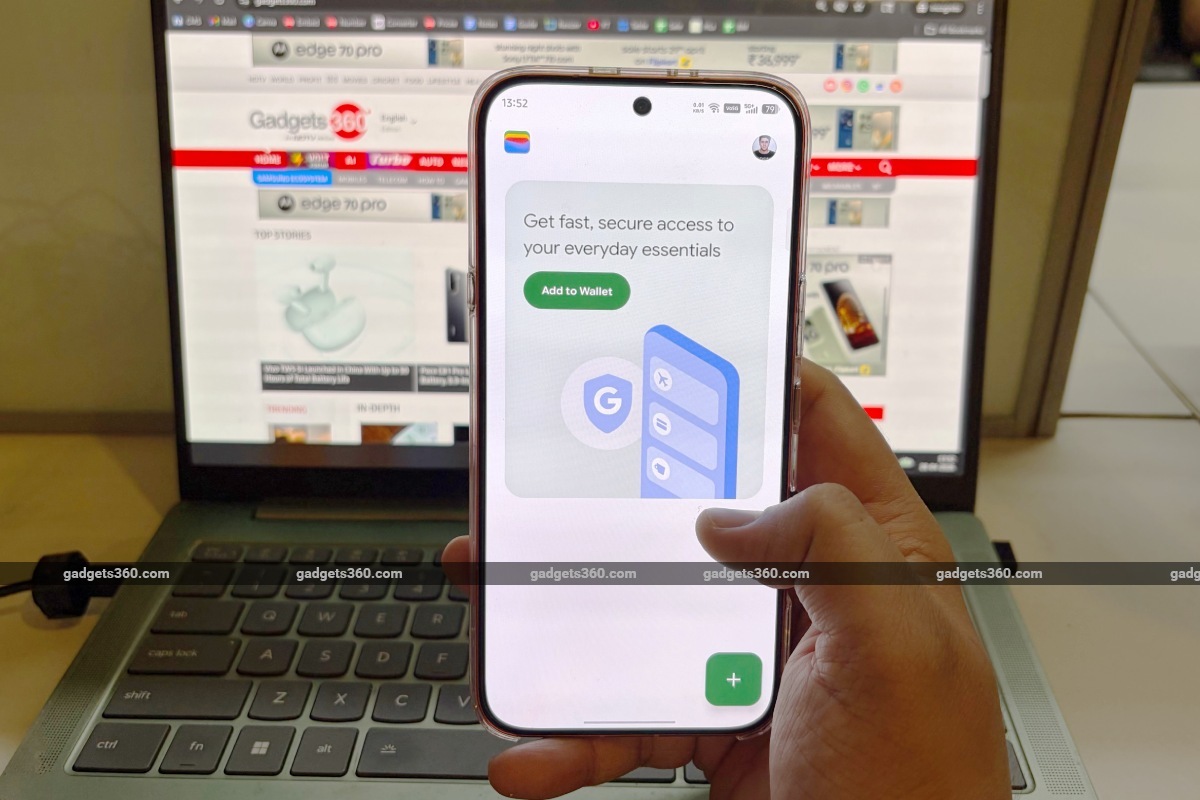
Here's How You Can Add Your Aadhaar to the Google Wallet
Click Here to Add Gadgets360 As A Trusted Source

Advertisement
Google Wallet was launched in India in May 2024 by the tech giant, allowing Android users to add ID cards for identification, boarding passes for easy access, and buy tickets for intra city transport services. On Tuesday, the company announced that the Google Wallet app is getting another upgrade in India. Now, you can add your Aadhaar card to the Google Wallet app. The tech giant collaborated with the Unique Identification Authority of India (UIDAI) to enable the functionality. The company has also partnered with multiple platforms, where you can produce your Aadhaar card for age and identity verification.
If you want to add your own Aadhaar card to Google Wallet on your smartphone, we have prepared a step-by-step guide for your convenience. You can read more about the features and use cases of Aadhaar Digital in Google Wallet here.
What are the Benefits of Adding Your Aadhaar Card to Google Wallet
The newly introduced functionality offers various use cases. Introduced by the government, Aadhaar acts as the primary proof of identification in the country, which is linked to other government-issued IDs. It's worth noting that the company has confirmed that adding a digital version of your Aadhaar card to Google Wallet does not make it a replacement for your physical card.
Even if you forget to bring your Aadhaar card with you, you can simply show it on the Google Wallet app. Moreover, this reduces the chances of you losing your Aadhaar card. You will also not have to send PDFs of your Aadhaar card to people, which can potentially lead to identity theft or misuse by a bad actor.
On top of this, Google has partnered with PVR Inox, India's largest cinema chain, where you will be able to produce your Aadhaar card via the Google Wallet app to verify your age. Additionally, you can submit your Aadhaar on the BharatMatrimony site for identification and Atlys, where you can use the autofill feature for visa applications using your Aadhaar card on the Google Wallet app. The company also plans to bring support for Mygate and Snabbit.
How to Add Aadhaar Card to Google Wallet via the Aadhaar App
- To add your Aadhaar to Google Wallet via the Aadhaar app, download the app on your handset from the Google Play Store, if you haven't already.
- Then, open the Aadhaar app.
- Sign in on the app and verify your identity by entering your Aadhaar number.
- You will receive an OTP on your registered phone number > log in by entering the same.
- Now, tap on the Add to Wallet button > select Google Wallet.
- Click on the Continue button.
- Now, you can follow the on-screen instructions to add Aadhaar to Google Wallet.
How to Add Aadhaar Card Using the Google Wallet App
- To add your Aadhaar to Google Wallet via the Google Wallet app, download the app on your phone from the Google Play Store.
- Once downloaded, open the Google Wallet app.
- Then, click on the + button in the bottom-right corner of the screen.
- Now, you must tap on the Aadhaar button. You will be redirected to the Aadhaar app.
- Follow the Step 3 to Step 7 mentioned above under the Aadhaar app section.
FAQs
1. Do I need to download the Aadhaar app to add my Aadhaar card to Google Wallet?
Yes, you will need to add the Aadhaar app to add your Aadhaar card to Google Wallet. However, you can also add your Aadhaar directly through the Google Wallet.
2. Can I add my Aadhaar card to Google Wallet for free?
Yes, Google allows users to add their Aadhaar card to the Google Wallet app at no additional cost.
3. Where can I download the Google Wallet app from?
You can download the Google Wallet app from the Google Play Store on your Android smartphone.
4. Where can I show my Aadhaar card through the Google Wallet app?
Google has partnered with PVR Inox, Bharatmatrimony, and Atlys, allowing you to produce your Aadhaar card to verify your age and identity.
Comments
Get your daily dose of tech news, reviews, and insights, in under 80 characters on Gadgets 360 Turbo. Connect with fellow tech lovers on our Forum. Follow us on X, Facebook, WhatsApp, Threads and Google News for instant updates. Catch all the action on our YouTube channel.
Related Stories




Advertisement
Follow Us




-
![[Sponsored] Galaxy Watch9 for Everyday Health Insights | Smarter Wellness Choices](https://www.gadgets360.com/static/desktop/images/spacer.png)
01:42
[Sponsored] Galaxy Watch9 for Everyday Health Insights | Smarter Wellness Choices -
01:15
[Sponsored] Galaxy Tab S10 Lite for Students: Notes, Solve Math and More -
04:17
[Sponsored] LG NANO 4K UHD AI TV NU885: Gemini Search, Dolby Atmos & 5 Years of Updates -
00:57
[Sponsored] Samsung Galaxy Z Fold8 My Fan Cam in Action: Find the Moment, Then Share It -
01:41
[Sponsored] What Do You Need To Know Before Your Next Run? | Samsung Galaxy Watch Ultra2
-
iPhone 16 Deal: ₹20 हजार सस्ता खरीदें iPhone 16, यहां मिल रहा है ऑफर
-
नया XGIMI 4K प्रोजेक्टर दीवार पर दिखाएगा IMAX स्टाइल में मूवी
-
Infinix GT 50 Pro 5G कल होगा भारत में लॉन्च, मिलेगी 6500mAh बैटरी!
-
Redmi K100 में मिलेगा 'Snow Rock White' का नया कलर ऑप्शन
-
Amazon Sale में ₹11 हजार सस्ता खरीदें Motorola का 50MP Sony कैमरा, 5500mAh बैटरी वाला 5G फोन!
Advertisement
Popular on Gadgets
- Samsung Galaxy S26 Ultra
- Motorola Razr Fold
- ChatGPT
- OPPO Find N6
- Mobiles Under Rs. 40,000
- Vivo X300 Ultra
- Asus Zenbook S14
- iQOO 15
- Vivo X300 Pro
- Lenovo Yoga Slim 7i Aura Edition
- iQOO 15R
- Vivo X Fold 5
- Sony PlayStation 5
- HP OmniPad 12
- OnePlus Nord CE 6 Lite
- OnePlus Pad 4
- OPPO F33 Pro 5G
- Cryptocurrency
- HP OmniBook Ultra 14 (2026)
- iPhone 17
- Eureka Forbes AP 355 Room Air Purifier
- Latest Mobile Phones
- Compare Phones
Latest Gadgets
- Vivo Y600
- HMD 2660 Flip Senior Edition
- Lava Aura Curve
- Poco X8s
- Samsung Galaxy F70 5G
- Tecno Spark 50S 5G
- Vivo Y600s Pro
- Vivo Y32 (2026)
- Lenovo Yoga 9n 2-in-1
- Lenovo Yoga Pro 9n
- Amazon Alexa Tablet 8
- Amazon Alexa Tablet 11
- Pebble Qore 2
- Amazfit T-Rex Dual Solar
- Toshiba 65-Inch 4K Ultra HD Smart Mini LED QLED TV (65Z670SP)
- Haier M70 Mini LED 65-inch
- Acer Predator Atlas 8
- Asus ROG Ally
- Blue Star 1.5 Ton 5 Star Inverter Split AC (IE518ZNURS)
- Blue Star 2 Ton 3 Star Inverter Window AC (WIE324L)

- About Us
- Sitemaps
- Feedback
- Archives
- Contact Us
- RSS
- Advertise
- Career
- Privacy Policy
- Ethics
- Editorial Policy
- Terms & Conditions
- Complaint Redressal
Download Our Apps
Available in Hindi
© Copyright Red Pixels Ventures Limited 2026. All rights reserved.