
-
 Amazon Great Indian Festival 2026: Best Laptops Under Rs. 1 Lakh9 October 2026
 -
Best Laptops Under Rs. 90,000 in India to Buy During Amazon, Flipkart Sale: Acer Aspire 7 (2026), Dell 15 (2025) and More3 October 2026
-
Dell 15 (2026) Launched in India With Up to Intel Core Ultra 7 and 15.6-Inch Display: Price, Features20 April 2026
- Home
- Laptops
- Laptops Reviews
- Dell 15 (2026) Review: Practical, Reliable, and a Little Too Safe?
Dell 15 (2026) Review: Practical, Reliable, and a Little Too Safe?
The Dell 15 (2026) is less about standing out and more about quietly handling everyday work.
Written by Sucharita Ganguly, Edited by Ketan Pratap | Updated: 20 April 2026 19:59 IST
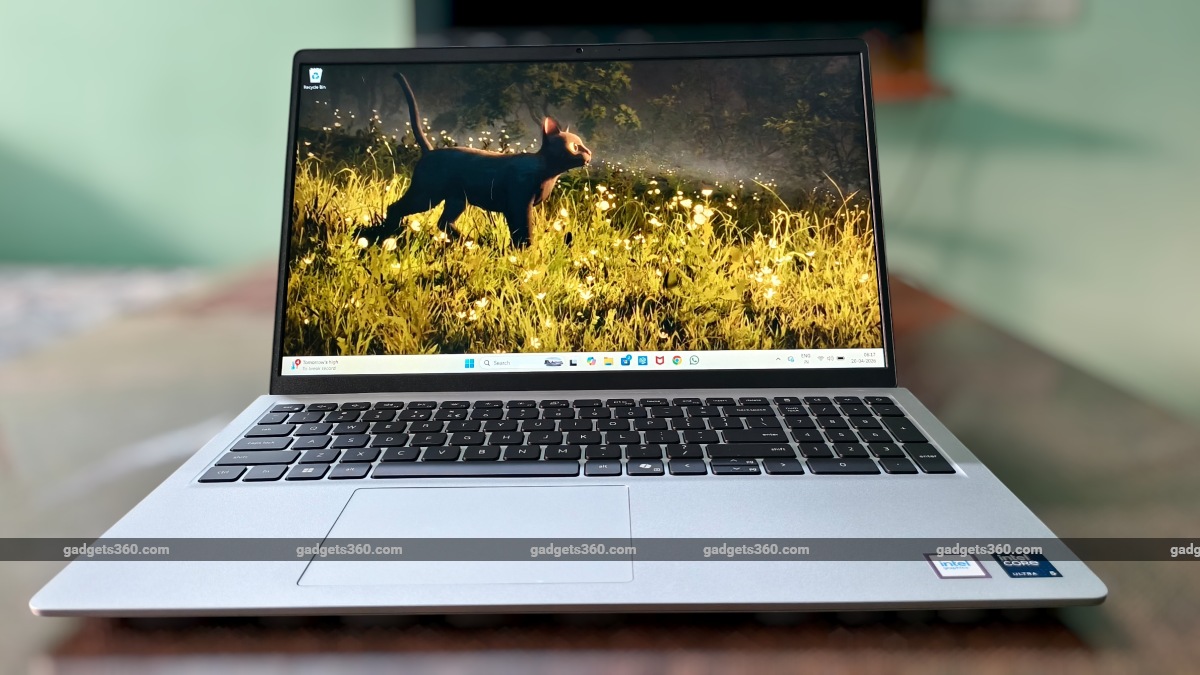
A large display and full-size keyboard make the Dell 15 well-suited for everyday work
Click Here to Add Gadgets360 As A Trusted Source

Advertisement
There is a certain kind of laptop that doesn't try to impress you right away, but grows on you the more you use it, and the Dell 15 (D15260) fits that description well. Starting at Rs. 69,699 in India, this 15-inch laptop is built around Intel's Core Ultra platform, with the 512GB SSD variant currently priced at Rs. 77,890. Our review unit is powered by the Intel Core Ultra 5 225H processor, paired with 16GB of DDR5 RAM and a 1TB SSD. Notably, Dell is offering the laptop with 512GB of storage for now, while the 1TB version has been sent in for review. In day-to-day use, though, the experience stays the same, making the Dell 15 a dependable option for everyday work and multitasking.
At first glance, the Dell 15 does not try to stand out. You see a large display, a full-size keyboard with a number pad, and a clean, understated chassis. But spend some time with it, and the focus shifts from what it looks like to how it behaves. The way it handles long typing sessions, the way it manages multiple tasks without drawing attention to itself, the way it quietly prioritises comfort over flash. This is not a laptop built to impress in a showroom. It is built to settle into your daily routine and stay there.
Dell 15 (2026) Design: Practical, Not Premium
- Dimensions – 358.50 mm x 235.56 mm x 16.96–18.99 mm
- Weight – Starting at 1.66kg
- Build – PC+ABS plastic chassis
- Keyboard – Full-size, spill-resistant, optional backlit
- Touchpad – Precision touchpad with gesture support
The polycarbonate body of the Dell 15 does not mimic metal finishes, which helps it avoid feeling artificial. The surface has a slightly matte texture, which helps with grip and keeps fingerprints from becoming an immediate problem. Over time, it feels like a device that can handle daily handling without constantly needing to be wiped down. At around 1.66kg, the weight sits right where you expect it to for a 15-inch laptop. It is not something you forget you are carrying, but it is balanced enough that it does not feel like a burden during regular commutes.
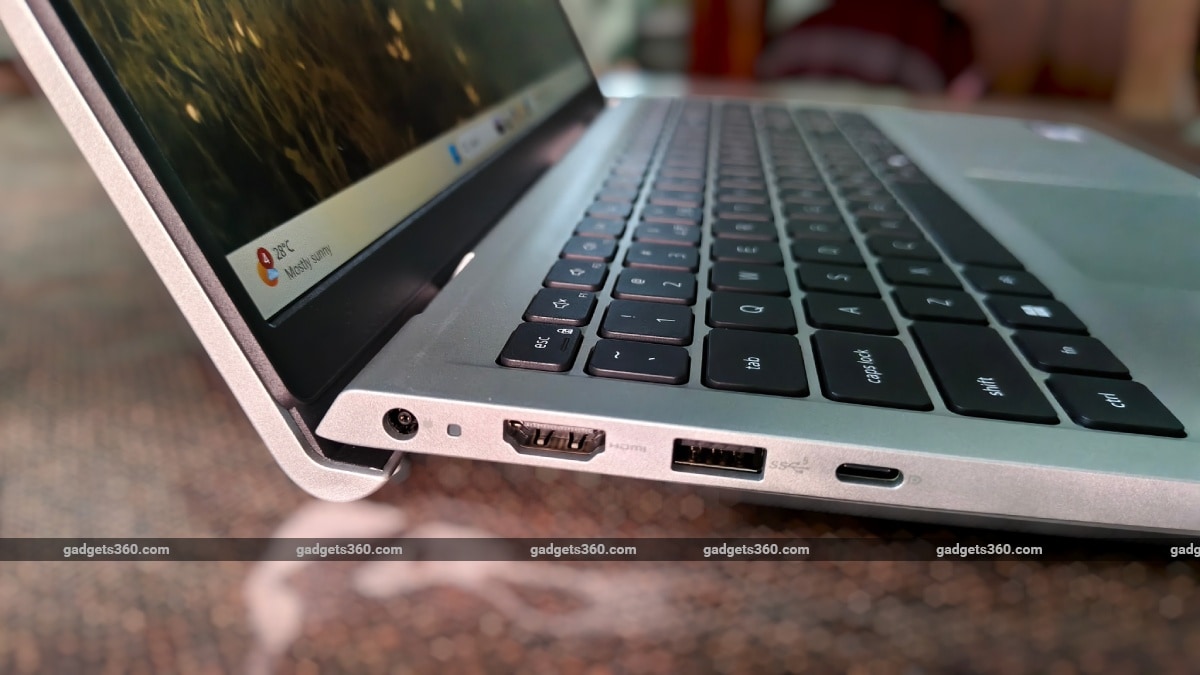
The hinge design slightly lifts the keyboard, making long typing sessions more comfortable
The hinge design ends up being one of the more thoughtful parts of the experience. As you open the lid, the base lifts slightly, angling the keyboard upward. It creates a more natural typing posture, especially when you are working for extended periods. Opening the lid itself is smooth and predictable. It does not resist you, but it also does not swing open loosely. You can open it with one hand without the base lifting, which enhances the design's sense of balance.
There is a bit of flex on the lid when pressure is applied. It is not excessive, but it is noticeable enough to remind you of the plastic construction. The keyboard deck, however, holds up better. It feels stable during typing and does not sink under pressure. The lid remains fairly stable while typing. There is minimal wobble unless you are actively moving the desk or typing aggressively, which helps maintain focus during work.
On the Dell 15, the port selection feels practical rather than minimal. You get USB-A ports split across both sides, which makes a noticeable difference in day-to-day use. You are not forced to cluster all your peripherals on one side, so plugging in something like a mouse, a USB drive, and a charger at the same time does not feel restrictive. There is also a full-function USB-C port, which adds flexibility depending on how you prefer to connect accessories. Alongside that, you have an HDMI port, a 3.5mm headphone jack, and a dedicated charging port, covering most of what you would expect from a laptop in this category.
What stands out more is the spacing. The ports are not tightly packed, so even with slightly bulkier connectors, they do not interfere with each other. You do not find yourself adjusting cables repeatedly just to make everything fit. At the same time, the layout still feels familiar. You are not searching for ports or adjusting your setup every time you plug something in. It is a small detail, but over time, it makes the laptop easier to live with.
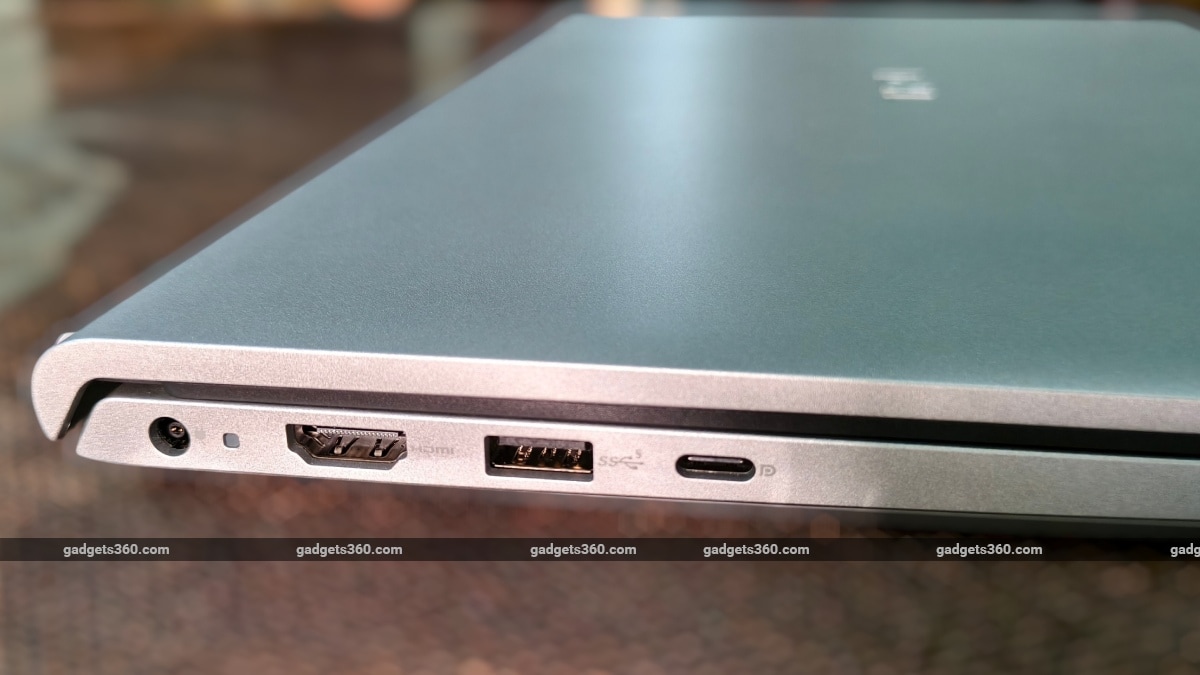
The Dell 15 keeps things simple with practical port placement and enough spacing for everyday use
The HDMI port is limited to 1080p output, which starts to matter if you are using an external monitor. Even if you connect it to a higher-resolution panel, the laptop will only output full HD, so you are not getting the sharpness or workspace that a 2K or 4K display would normally offer.
Dell 15 (2026) Display: Usable But Not The Brightest
- Size – 15.6-inch non-touch FHD
- Resolution – 1920 x 1080 pixels
- Refresh Rate – 60Hz
- Brightness – 300 nits
- Colour Gamut – 45 percent NTSC
- Finish – Anti-glare
The Dell 15 uses a 15.6-inch full-HD display with a matte finish and a brightness rating of up to 300 nits, and in everyday use, it feels straightforward and easy to work with. Indoors, the experience is comfortable, with sharp text and an anti-glare coating that actually helps. You are not constantly dealing with reflections from overhead lights, so it is easy to settle in and focus on work without having to adjust the screen every few minutes. When you move closer to a window or into brighter conditions, the display still holds up, but you will find yourself pushing the brightness closer to its maximum. It remains usable, but you are more aware of its limits, especially in harsher lighting.
You do start to notice the limits of the panel once you spend more time with it. Colours don't really stand out, which lines up with the 45 percent NTSC coverage. Photos and videos look fine for casual viewing, but they miss that richness and depth you would expect from a more colour-accurate display. The same applies to contrast. Darker scenes lack a bit of depth, with blacks appearing slightly lighter than they should, which makes the content look a little flatter than ideal.
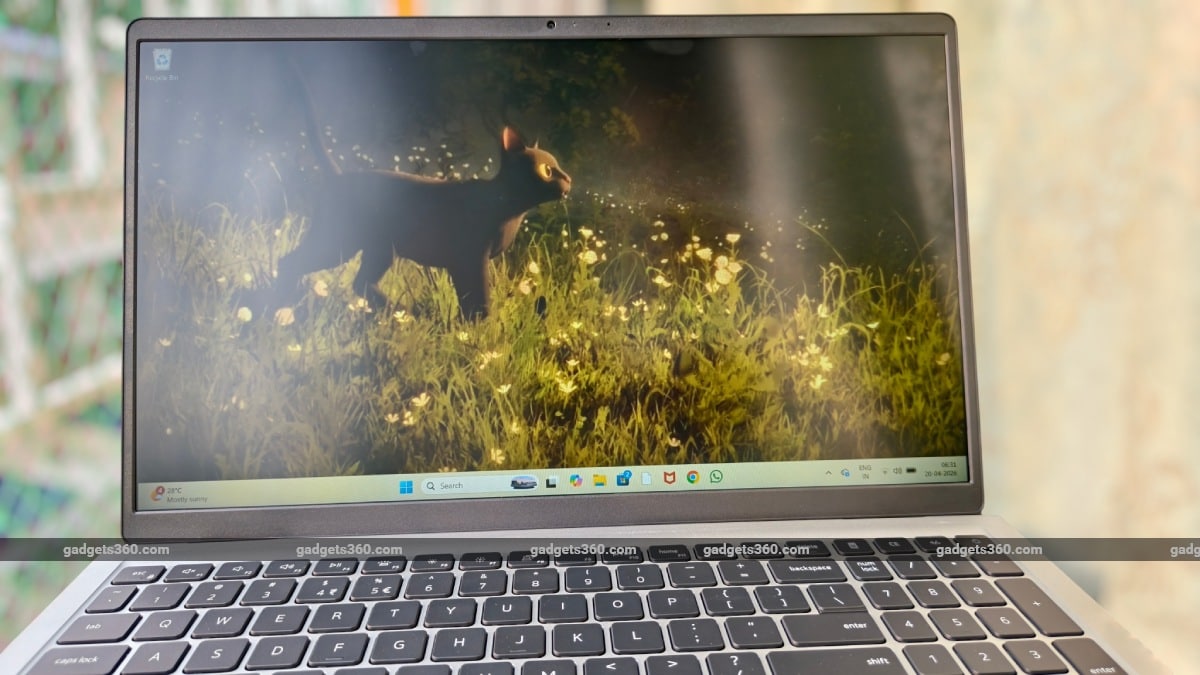
The anti-glare display helps reduce reflections, but brightness can feel limited in harsher lighting
That said, none of this really gets in the way of everyday use. Reading, writing, browsing, and video calls all feel comfortable over long stretches, and that is clearly where this display is meant to be used. Even when you shift your position, the panel holds up well. Colours and brightness stay consistent enough that you are not constantly readjusting your seating. Over longer sessions, ComfortView starts to make a difference. You may not notice it immediately, but after a few hours, especially in the evening, the screen feels easier on your eyes. The slim bezels also help the overall experience. They do not change the panel itself, but they make the screen feel more open and less confined.
Dell 15 (2026) Keyboard, Touchpad, Speakers, and Webcam: Great Keyboard, Average Everything Else
- Keyboard – Full-size with numeric keypad
- Speakers – Dual speakers
- Audio – Universal audio port (3.5mm)
- Webcam – 720p HD with single digital microphone
Typing on the Dell 15 feels easy to settle into. The full-size keyboard, with the numeric keypad, gives you enough room to spread out, especially if you are working with numbers or documents all day. The keys have a balanced travel, so they don't feel too shallow or too deep, and after a while, your fingers just fall into a natural rhythm.
There is a softness to the keystrokes that keeps the noise down. It does not have that sharp, clicky sound, which works well if you are working around other people or on calls. The lifted hinge helps more than expected here. Your wrists sit at a slightly better angle, and over longer sessions, you do not feel that pressure building up near the edge of the laptop. If you are working in the evening or in a dim room, the backlit keyboard on supported configurations makes things easier without being distracting.
The touchpad feels straightforward to use. There is enough space to move around comfortably, and gestures register reliably without needing to repeat them. Clicks lean towards the softer side rather than feeling sharply defined, but they stay consistent. You are not second-guessing whether something registered or not. Even near the edges, tracking stays reliable, so you do not run into awkward dead zones while scrolling or swiping.
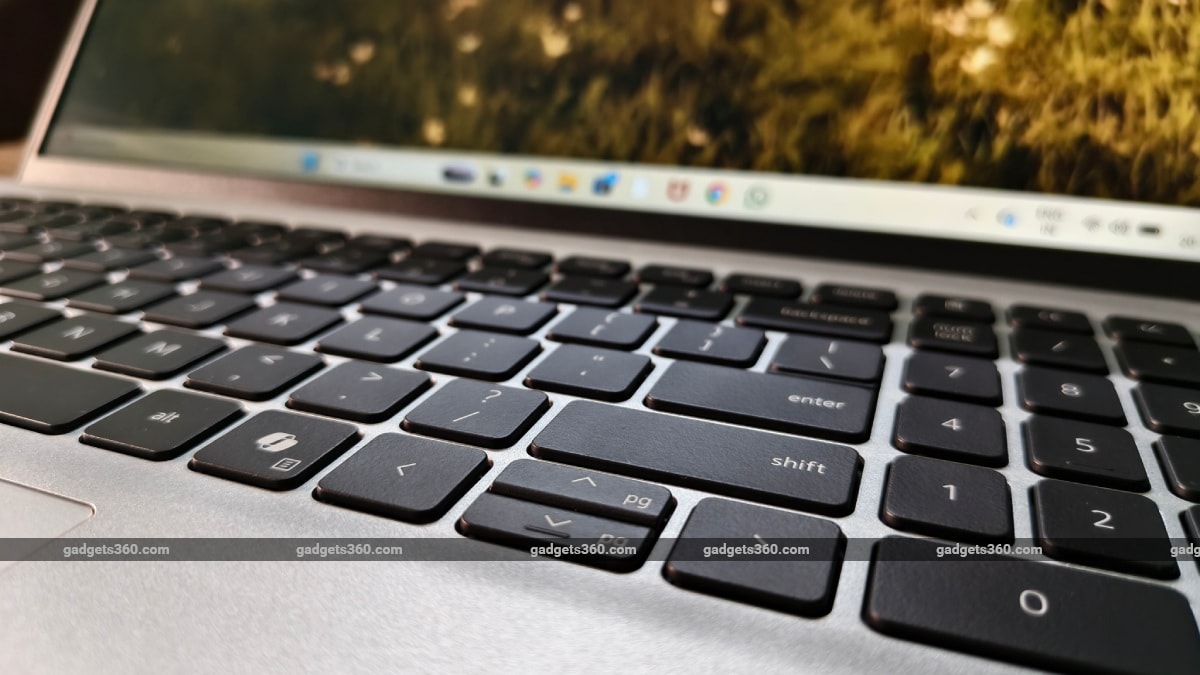
The full-size keyboard feels comfortable to type on, with soft keystrokes that work well for long sessions
The speakers do the job, but they stay fairly basic. Voices come through clearly during calls, and videos are easy to follow, but there is not much depth to the sound. You notice the lack of bass quickly, and even at higher volumes, the audio feels more personal than immersive. For video calls, the webcam and microphone setup keep things usable. In good lighting, the image is clear enough for meetings, though not particularly sharp. As the lighting drops, you start to see more softness and grain. The microphone handles voice clarity well. Even with some background noise, your voice comes through clearly enough that you do not have to repeat yourself.
Dell 15 (2026) Software: Clean and Unobtrusive
- Operating System – Windows 11 Home
- Software – Dell Optimizer, SupportAssist, Dell Digital Delivery, MyDell
The Dell 15 runs Windows 11 Home, and for the most part, it just feels like Windows the way you expect it to. There are no major customisations or changes to how things work, so if you've used a Windows laptop before, you settle in almost immediately. Dell's own apps are there, but they don't really get in your way. Optimizer and SupportAssist run quietly in the background, and you only come across them when you actually need something. They are not constantly popping up or asking for attention, which helps keep things from feeling cluttered. ComfortView is present here as well, but it works quietly in the background. It is not something you interact with directly, and once it is enabled, it just does its job without needing attention.
The Copilot key is hard to miss. It sits right there on the keyboard, and pressing it instantly brings up Microsoft's AI assistant. Whether you end up using it regularly is a different question, but having a dedicated key does make it feel like a built-in part of the system rather than something tucked away.
Security features like TPM are built in, but they stay in the background. Some configurations also include a fingerprint reader for quicker logins, but the review unit does not. Wi-Fi stays stable, Bluetooth devices connect without fuss, and once everything is set up, you rarely have to think about it again.
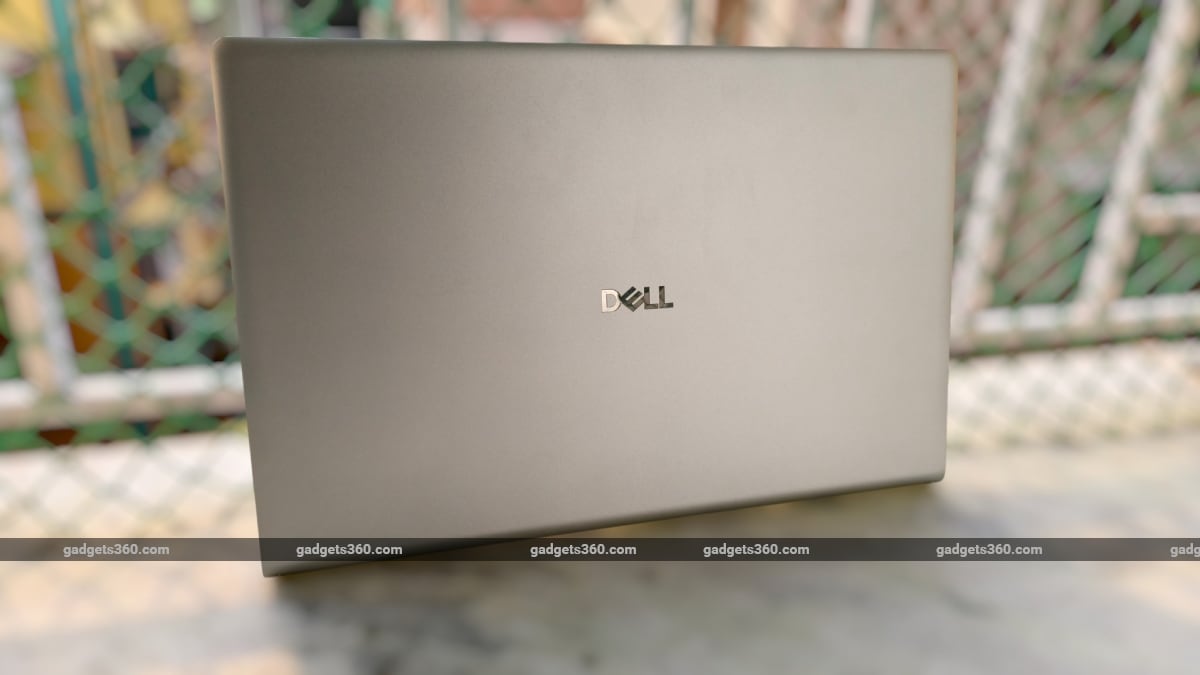
The clean, understated design does not try to stand out, but it feels easy to live with over time
Nothing feels overdone or intrusive. You are not spending time managing software or turning things off. You just open the laptop and get on with what you need to do, which fits the Dell 15's overall nature.
Dell 15 (2026) Performance: Reliable, Not Powerful
- Processor – Intel Core Ultra 5 225H (14 cores, up to 4.9GHz)
- Graphics – Integrated Intel graphics
- RAM – 16GB DDR5, 5600 MT/s (single-channel)
- Storage – Up to 1TB PCIe SSD
This Dell 15 review unit is powered by the Intel Core Ultra 5 225H processor, paired with 16GB of DDR5 RAM running at 5600 MT/s and close to 1TB of SSD storage, and in day-to-day use, it settles into a rhythm fairly quickly. Most of the time, it just feels responsive in a way that does not draw attention to itself. Apps open quickly, switching between browser tabs and documents feels smooth, and even with a mix of work going on, like a video call in the background and multiple tabs open, it does not feel like it is struggling to keep up.
I was able to maintain a fairly typical workload without having to think about it. A browser with a dozen or so tabs, a couple of documents, and media playing alongside, and the system stayed consistent. It does not feel particularly fast in bursts, but it also does not slow down unpredictably. That lines up with the PCMark 10 score of 3,667. It is not a particularly high number for this segment, and it reflects what I experienced in use. The laptop handles everyday tasks comfortably, but once the workload starts to build up, it does not have the same headroom as more performance-focused systems.
| Benchmark | Dell 15 | Asus Vivobook S14 | Moto Book 60 |
|---|---|---|---|
| Cinebench R23 Single Core | 1871 | 1920 | 1695 |
| Cinebench R23 Multi Core | 8198 | 10666 | 7742 |
| Geekbench 6 Single Core | 2584 | 2719 | 2760 |
| Geekbench 6 Multi Core | 10528 | 10750 | 8929 |
| PCMark 10 | 3667 | 5911 | 4758 |
| 3DMark Night Raid | 19781 | 21456 | 14162 |
| 3DMark CPU Profile | 7141 | 6937 | 4649 |
| 3DMark Steel Nomad Light | 2031 | 1567 | 750 |
| CrystalDiskMark (Read/Write) | 6005.08 / 5316.80 MB/s | 6389.55 / 5719.31 MB/s | 6562.70 / 5430.97 MB/s |
The 16GB of RAM helps here. There is enough headroom to move between tasks without things closing or reloading constantly. That said, it is running in single-channel mode, which does hold it back slightly. You do not really notice it in basic use, but under heavier multitasking or more demanding workloads, it does mean the system is not using its full potential. In situations where you are juggling a lot at once, like multiple browser tabs, background apps, and a video call, things can feel a bit less fluid than expected for this hardware. It is not a major slowdown, but there is a slight lack of headroom as the workload builds. It also affects integrated graphics, since they rely on system memory, further limiting performance in more demanding scenarios.
Graphics performance stays in line with what you would expect from an integrated setup. It handles everyday visuals, streaming, and lighter workloads without issue, but anything more demanding, whether that is gaming or heavier creative work, is clearly outside its comfort zone.
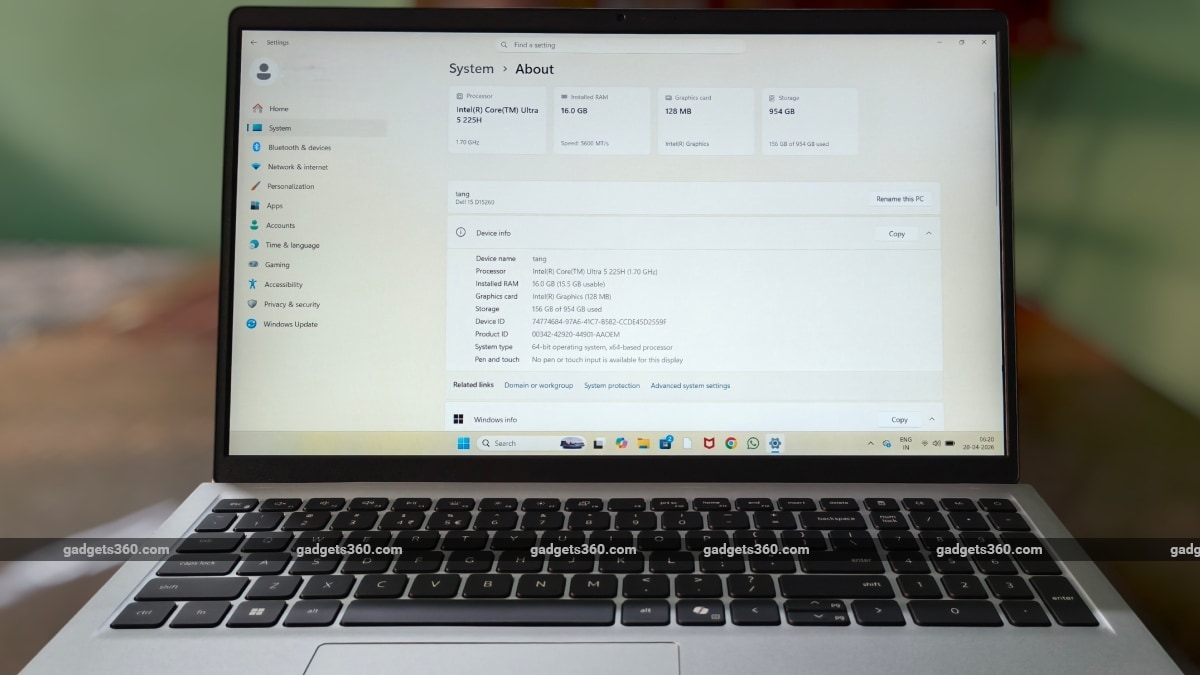
Powered by the Intel Core Ultra 5 225H, the Dell 15 focuses on steady everyday performance
In regular use, the laptop stays comfortable to work on. Even after a while, it does not get noticeably warm, whether it is on a desk or your lap. When you push it a bit more, you can feel it warming up, but it never gets to the point where it feels distracting or uncomfortable. The fans behave similarly. They stay quiet for most everyday tasks, so you do not really notice them. Once the workload increases, you can hear them kick in, but the sound stays controlled and does not suddenly spike or become intrusive.
After using it for a while, the performance feels steadier than fast. It does not really have those moments where it suddenly feels quick or snappy, but at the same time, it does not slow you down either. For most everyday work, it just keeps up without making you think about it.
Dell 15 (2026) Battery: Shorter Than Needed
- Battery – 3-cell, 41Wh lithium polymer
- Charging – 65W AC adapter
- Fast Charging – ExpressCharge support
The Dell 15 comes with a 41Wh battery and supports ExpressCharge, and in my use, it settled into a fairly predictable pattern. On a single charge, I was getting around four to five hours, depending on what I was doing. Lighter work like browsing, writing, and video calls pushed it closer to five, while heavier multitasking brought it down faster.
It was enough for a few hours of focused work, but not something I could rely on for a full day away from a charger. I ended up plugging it in during breaks. The 65W charger is also easy to carry, so keeping it with me through the day felt practical. Over time, the experience became less about pushing battery life and more about staying topped up without interrupting my workflow.
Dell 15 (2026) Verdict
The Dell 15 makes its priorities clear. It is not trying to compete on design or push high-end performance. Instead, it focuses on getting the basics right for everyday use. The keyboard is comfortable enough for long sessions, performance stays steady for regular work and multitasking, and features like the full-size layout and practical port selection make it easy to use as a daily machine. At the same time, the compromises are easy to spot. The display is functional but not vibrant, the plastic build does not feel particularly premium, and battery life, at around four to five hours in my use, means you will be reaching for the charger during the day.
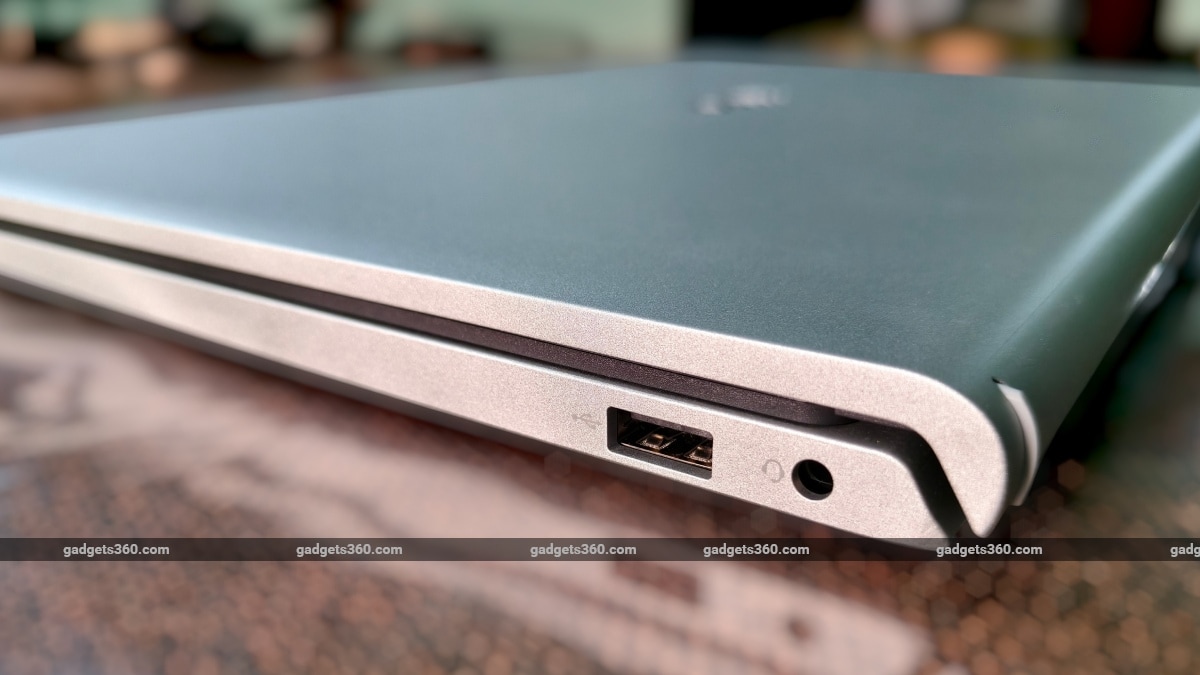
You get a good mix of ports, including USB-A, USB-C, HDMI, 3.5mm jack and a dedicated charging port
It is also worth noting that the review unit uses a 1TB SSD, while the highest currently available variant in India, at 512 GB, is priced at Rs. 77,890. The experience remains unchanged, but storage and pricing are worth considering depending on your needs. If you want a dependable 15-inch laptop for work, typing, and general use, the Dell 15 fits in comfortably. But if display quality, battery life, or a more premium design matter more to you, alternatives like the Asus Vivobook S16 and Moto Book 60 make a stronger case in this price range.
The Asus Vivobook S16 (S3607QA) (Review), for instance, leans more towards design and battery life, making it a better fit if you want something more visually refined with longer unplugged use. The Moto Book 60 (Review), on the other hand, brings a sharper OLED display and a more premium build at a similar price, even if its performance stays in the same “good enough” range.
- REVIEW
- KEY SPECS
- NEWS
- Good
- Comfortable keyboard
- Stable everyday performance
- Practical port selection
- Anti-glare display
- Bad
- Relatively dull display colours
- Single-channel RAM
- 1080p-only HDMI output
Read detailed Dell 15 (D15260) review
Display size 15.60-inch
Display resolution 1920x1080 pixels
Touchscreen No
Processor Intel Core Ultra 5
RAM 16GB
OS Windows 11 Home
SSD 512GB
Weight 1.66 kg
More Dell Laptops
Comments
Get your daily dose of tech news, reviews, and insights, in under 80 characters on Gadgets 360 Turbo. Connect with fellow tech lovers on our Forum. Follow us on X, Facebook, WhatsApp, Threads and Google News for instant updates. Catch all the action on our YouTube channel.
Related Stories


Advertisement
Follow Us




-
![[Sponsored] LG NANO 4K UHD AI TV NU885: Gemini Search, Dolby Atmos & 5 Years of Updates](https://www.gadgets360.com/static/desktop/images/spacer.png)
04:17
[Sponsored] LG NANO 4K UHD AI TV NU885: Gemini Search, Dolby Atmos & 5 Years of Updates -
00:57
[Sponsored] Samsung Galaxy Z Fold8 My Fan Cam in Action: Find the Moment, Then Share It -
01:41
[Sponsored] What Do You Need To Know Before Your Next Run? | Samsung Galaxy Watch Ultra2 -
01:32
[Sponsored] Big Day Tomorrow? Prep Today | Samsung Galaxy Watch Ultra2 -
04:37
[Sponsored]: CP PLUS CarKam CP-F89B: 4K Dashcam With Rear Camera, GPS & Emergency Recording
-
आ गई हवा में उड़ने वाली Tesla Roadster कार, आखिर सच हुआ फिल्मों वाला कमाल
-
रोबोट ने की लड़की से छेड़छाड़, पीछे से पकड़ा और किए गंदे इशारे, जानें
-
PS5 कहां मिलेगा सस्ता, Flipkart या Amazon, जानें सबकुछ
-
Flipkart Big Billion Sale 2026: ₹10 हजार से ₹15 हजार में मिल रहे Mivi, Lava, Boltt के AI कैमरा फोन
-
Poco X8s में मिलेगी 12GB रैम, Snapdragon 7 Gen 4 चिप!
Advertisement
Popular on Gadgets
- Samsung Galaxy S26 Ultra
- Motorola Razr Fold
- ChatGPT
- OPPO Find N6
- Mobiles Under Rs. 40,000
- Vivo X300 Ultra
- Asus Zenbook S14
- iQOO 15
- Vivo X300 Pro
- Lenovo Yoga Slim 7i Aura Edition
- iQOO 15R
- Vivo X Fold 5
- Sony PlayStation 5
- HP OmniPad 12
- OnePlus Nord CE 6 Lite
- OnePlus Pad 4
- OPPO F33 Pro 5G
- Cryptocurrency
- HP OmniBook Ultra 14 (2026)
- iPhone 17
- Eureka Forbes AP 355 Room Air Purifier
- Latest Mobile Phones
- Compare Phones
Latest Gadgets
- Tecno Spark 50S 5G
- Vivo Y600s Pro
- Vivo Y32 (2026)
- Infinix Smart 20 HD
- Vivo V80
- Vivo S2 FE
- Vivo Y600K Turbo
- Realme P4s Lite
- HP ZBook Ultra G3a
- Dell Pro Rugged 14
- Amazon Alexa Tablet 8
- Amazon Alexa Tablet 11
- Amazfit T-Rex Dual Solar
- OPPO Watch S2
- Toshiba 65-Inch 4K Ultra HD Smart Mini LED QLED TV (65Z670SP)
- Haier M70 Mini LED 65-inch
- Acer Predator Atlas 8
- Asus ROG Ally
- Blue Star 1.5 Ton 5 Star Inverter Split AC (IE518ZNURS)
- Blue Star 2 Ton 3 Star Inverter Window AC (WIE324L)

- About Us
- Sitemaps
- Feedback
- Archives
- Contact Us
- RSS
- Advertise
- Career
- Privacy Policy
- Ethics
- Editorial Policy
- Terms & Conditions
- Complaint Redressal
Download Our Apps
Available in Hindi
© Copyright Red Pixels Ventures Limited 2026. All rights reserved.
-
 Apple Watch Series 12
Starts from ₹56,900
Apple Watch Series 12
Starts from ₹56,900
-
 Samsung Galaxy Watch Ultra 2
Starts from ₹62,479
Samsung Galaxy Watch Ultra 2
Starts from ₹62,479
-
 Samsung Galaxy Watch 9 (44mm, LTE)
Starts from ₹41,999
Samsung Galaxy Watch 9 (44mm, LTE)
Starts from ₹41,999
-
 Samsung Galaxy Watch 9 (40mm, LTE)
Starts from ₹38,999
Samsung Galaxy Watch 9 (40mm, LTE)
Starts from ₹38,999
-
 Samsung Galaxy Watch 9 (40mm)
Starts from ₹36,999
Samsung Galaxy Watch 9 (40mm)
Starts from ₹36,999
-
 Samsung Galaxy Watch 9 (44mm)
Starts from ₹40,999
Samsung Galaxy Watch 9 (44mm)
Starts from ₹40,999
-
 Amazon Great Indian Festival 2026: Best Deals on All Haier Products Like Refrigerators, Washing Machines and Geysers
-
 Amazon Great Indian Festival 2026: Gaming Headset Deals Under Rs. 5,000
-
 Amazon Great Indian Festival 2026 Sale: Best Gaming Monitors Under Rs. 20,000
-
 Amazon Great Indian Festival 2026: Best Power Bank Deals