- Home
- How to
- How to Features
- How to Schedule Messages on Google Chat: A Step by Step Guide
How to Schedule Messages on Google Chat: A Step-by-Step Guide
You can choose a specific send time up to 120 days in advance, which is useful when working across time zones or avoiding late-night messages.
Written by Sucharita Ganguly, Edited by David Delima | Updated: 26 January 2026 13:00 IST
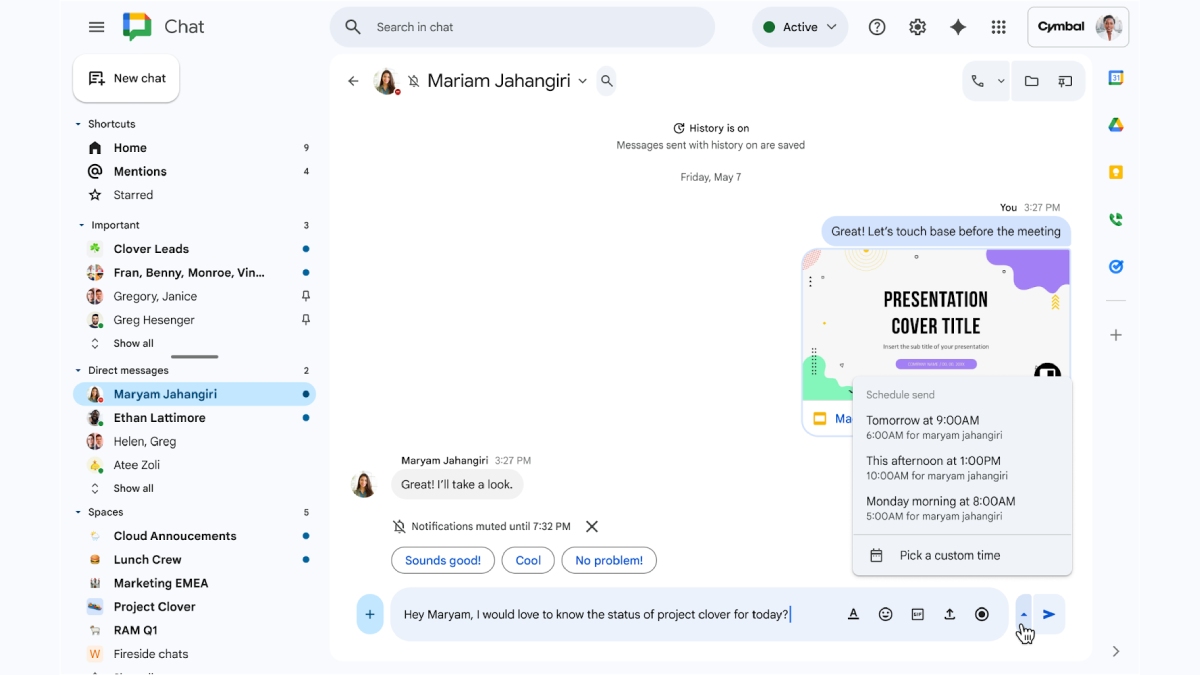
Photo Credit: Google
If you use Google Chat for work or group conversations, this feature can make communication easier
Click Here to Add Gadgets360 As A Trusted Source

Advertisement
Google rolled out the scheduled messages feature in Google Chat in December 2025, giving you a built-in way to send messages at a later time or date. You can choose a specific send time up to 120 days in advance, which is useful when working across time zones or avoiding late-night messages. Once a message is scheduled, Google Chat shows a banner above the compose box and adds a Drafts shortcut, where you can edit, reschedule, or cancel messages before they are sent.
If you use Google Chat for work or group conversations, this feature can make communication easier. Whether you are following up on tasks, sending reminders during office hours, or planning messages for a busy day, scheduling helps you stay organised. In this copy, we will walk you through how to schedule messages on Google Chat step by step, so you can send the right message at the right time.
How to Schedule Messages on Google Chat on Desktop
- To schedule a message, you need to first open Google Chat, either through Gmail or by visiting chat.google.com, and then select the conversation where you want to send the message.
- Once the conversation is open, type your message in the compose box just as you normally would.
- Instead of sending it right away, click the down arrow next to the send button, which appears as a paper airplane icon.
- From the menu that appears, choose one of the suggested times or select Pick a custom time to set a specific date and time.
- After choosing the time, tap the send button to schedule the message for delivery at the selected time.
How to Schedule Messages on Google Chat on Mobile
- You need to first open the Google Chat app on your phone and select the conversation where you want to send the message.
- After opening the conversation, draft your message in the text box as you normally would.
- Instead of sending it immediately, tap the arrow icon next to the send button to open the scheduling options.
- From the list, select one of the suggested times or choose a custom date and time that works for you.
- Once you have picked the time, tap Schedule or Save to finalise the message.
Once you schedule a message, Google Chat shows a banner above the compose box with the scheduled send time. You can tap or click this banner to view the message and edit, reschedule, send, or cancel it. On desktop, Google Chat also adds a Drafts shortcut in the left sidebar, where you can manage all scheduled messages from one place.
FAQs
1. Can I edit or cancel a scheduled message in Google Chat?
Yes, you can edit, reschedule, send, or cancel a scheduled message before it is delivered. Google Chat shows a banner above the compose box for scheduled messages, and on desktop, you can also use the Drafts shortcut to manage all pending messages.
2. How far in advance can I schedule a message on Google Chat?
Google Chat lets you schedule messages up to 120 days in advance, making it useful for planning reminders, follow-ups, or messages across different time zones.
3. Is the scheduled messages feature available on both desktop and mobile?
You can schedule messages on both the desktop and mobile versions of Google Chat. The steps are slightly different, but the feature works the same way on both platforms.
Comments
Get your daily dose of tech news, reviews, and insights, in under 80 characters on Gadgets 360 Turbo. Connect with fellow tech lovers on our Forum. Follow us on X, Facebook, WhatsApp, Threads and Google News for instant updates. Catch all the action on our YouTube channel.
Further reading:
How to Schedule Messages on Google Chat, How to Schedule Messages, Google Chat, Google


Advertisement
Follow Us




-
![[Sponsored] Galaxy Watch9 for Everyday Health Insights | Smarter Wellness Choices](https://www.gadgets360.com/static/desktop/images/spacer.png)
01:42
[Sponsored] Galaxy Watch9 for Everyday Health Insights | Smarter Wellness Choices -
01:15
[Sponsored] Galaxy Tab S10 Lite for Students: Notes, Solve Math and More -
04:17
[Sponsored] LG NANO 4K UHD AI TV NU885: Gemini Search, Dolby Atmos & 5 Years of Updates -
00:57
[Sponsored] Samsung Galaxy Z Fold8 My Fan Cam in Action: Find the Moment, Then Share It -
01:41
[Sponsored] What Do You Need To Know Before Your Next Run? | Samsung Galaxy Watch Ultra2
-
Flipkart Big Bang Diwali Sale होगी 28 अक्टूबर से शुरू, iPhone 17 पर छूट
-
Tata Punch EV आई सबसे ज्यादा पसंद, 284% की ग्रोथ के साथ बनी नंबर 1 कार
-
Samsung Galaxy S25 FE 5G दिवाली सेल में ₹17 हजार से ज्यादा सस्ता
-
Oppo Find X10 नए ग्रीन कलर वेरिएंट में लॉन्च, 8000mAh बैटरी, 200MP दो कैमरा वाला फोन
-
Realme ला रही नया मिडरेंज फोन, 200MP कैमरा, 10,000mAh होगी बैटरी!
Advertisement
Popular on Gadgets
- Samsung Galaxy S26 Ultra
- Motorola Razr Fold
- ChatGPT
- OPPO Find N6
- Mobiles Under Rs. 40,000
- Vivo X300 Ultra
- Asus Zenbook S14
- iQOO 15
- Vivo X300 Pro
- Lenovo Yoga Slim 7i Aura Edition
- iQOO 15R
- Vivo X Fold 5
- Sony PlayStation 5
- HP OmniPad 12
- OnePlus Nord CE 6 Lite
- OnePlus Pad 4
- OPPO F33 Pro 5G
- Cryptocurrency
- HP OmniBook Ultra 14 (2026)
- iPhone 17
- Eureka Forbes AP 355 Room Air Purifier
- Latest Mobile Phones
- Compare Phones
Latest Gadgets
- Vivo Y600
- HMD 2660 Flip Senior Edition
- Lava Aura Curve
- Poco X8s
- Samsung Galaxy F70 5G
- Tecno Spark 50S 5G
- Vivo Y600s Pro
- Vivo Y32 (2026)
- Lenovo Yoga 9n 2-in-1
- Lenovo Yoga Pro 9n
- iPad mini (2026)
- Amazon Alexa Tablet 8
- Pebble Qore 2
- Amazfit T-Rex Dual Solar
- Toshiba 65-Inch 4K Ultra HD Smart Mini LED QLED TV (65Z670SP)
- Haier M70 Mini LED 65-inch
- Acer Predator Atlas 8
- Asus ROG Ally
- Blue Star 1.5 Ton 5 Star Inverter Split AC (IE518ZNURS)
- Blue Star 2 Ton 3 Star Inverter Window AC (WIE324L)

- About Us
- Sitemaps
- Feedback
- Archives
- Contact Us
- RSS
- Advertise
- Career
- Privacy Policy
- Ethics
- Editorial Policy
- Terms & Conditions
- Complaint Redressal
Download Our Apps
Available in Hindi
© Copyright Red Pixels Ventures Limited 2026. All rights reserved.