-
 How to Add Aadhaar Card to Google Wallet: A Step-By-Step Guide28 April 2026
 -
Google Wallet Adds Support for Aadhaar Digital ID in India With Support for In-Person and Remote Verification28 April 2026
-
Apple, Samsung and Other Firms Reportedly Push Back on Preinstallation of Aadhaar App on Phones20 March 2026
-
New Aadhaar App: How to Change Your Mobile Number and Address Online29 January 2026
-
How to Share Your Contact Card Using the New Aadhaar App: A Step-by-Step Guide28 January 2026
UIDAI Says New Aadhaar App Will Soon Allow Users to Update Mobile Numbers
The number updation process in the new Aadhaar app will require OTP and face authentication.
Written by Akash Dutta, Edited by Ketan Pratap | Updated: 28 November 2025 15:01 IST
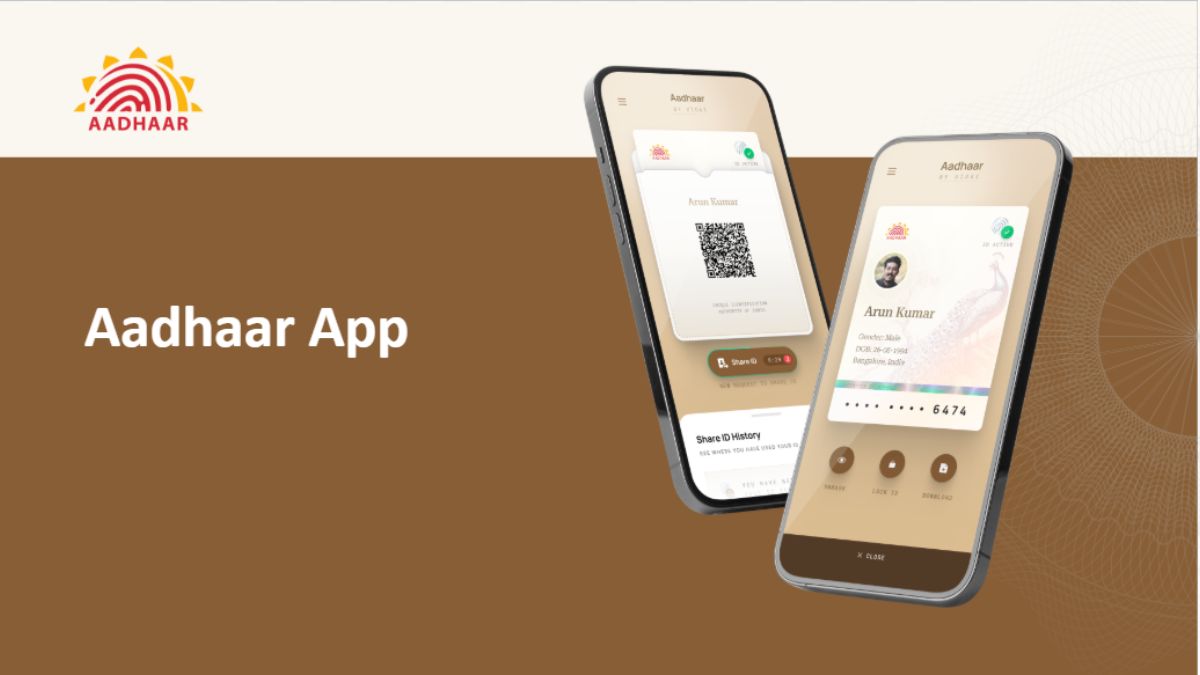
Photo Credit: Google Play
UIDAI has not revealed when this feature will rolled out to users
Click Here to Add Gadgets360 As A Trusted Source

Advertisement
Unique Identification Authority of India (UIDAI), on Friday, announced a new feature for the new Aadhaar app. The app, which was launched on Android's Play Store and iOS' App Store on November 9, will soon support mobile number updation. The new capability will require users to share one-time password (OTP) and face authentication to link a new number to the app. This will expand the utility of the new app from a digital identity viewing platform to one where users can also make updates to their data. However, the new app is still not replacing the older mAadhaar app.
New Aadhaar App Feature Announced
In a post on X (formerly known as Twitter), the official handle of UIDAI said that new Aadhaar app users will soon be able to update the mobile number associated with their Aadhaar card via the app. This will eliminate the hassle of physically visiting the centres and standing in queues to do the same. The Aadhaar app will now allow users to update the mobile number by using OTP and face authentication.
The regulatory body has also asked the early adopters of the platform to share feedback about the in-app experience. Those interested can share their feedback to UIDAI on feedback.app@uidai.net.in.
This is the first new feature announced for the app, after its launch. Before this, users could add their own and their family members' IDs, as long as it is linked to the same phone number. The current limit of adding Aadhaar profiles is up to five. Apart from it, the app also offers biometric locks to secure the data, share QR codes and verifiable credentials, and scan QR codes related to Aadhaar services.
How to Use the New Aadhaar App
- To use the app, you will first have to download and install it from the Play Store or App Store.
- Then, you will have to select your preferred language and enter your 12-digit Aadhaar number.
- The app will then ask to send an SMS from your Aadhaar-registered mobile number.
- Once the OTP has been entered, you will be redirected to perform face authentication.
- After completing the Face auth, you will have to enter a six-digit password.
- That's it. Now you can see your Aadhaar card on the app's profile page. You can also mask it, share it, and add a biometric lock.
The same process can be repeated to add up to four more Aadhaar profiles.
Comments
Get your daily dose of tech news, reviews, and insights, in under 80 characters on Gadgets 360 Turbo. Connect with fellow tech lovers on our Forum. Follow us on X, Facebook, WhatsApp, Threads and Google News for instant updates. Catch all the action on our YouTube channel.
Related Stories





Advertisement
Follow Us




-
![[Sponsored]: CP PLUS CarKam CP-F89B: 4K Dashcam With Rear Camera, GPS & Emergency Recording](https://www.gadgets360.com/static/desktop/images/spacer.png)
04:37
[Sponsored]: CP PLUS CarKam CP-F89B: 4K Dashcam With Rear Camera, GPS & Emergency Recording -
04:23
[Partner Content] Your Phone Can Do WAY More Than You Think | OPPO ColorOS 16 -
01:59
Samsung Galaxy Z Fold8 Ultra: Unfold the Ultra Night -
03:24
Apple Pay Launches In India: Supported Devices, Cards And Payments Explained -
00:21
[Sponsored] Samsung Galaxy Z Fold8, Fold8 Ultra
-
Amazon Great Indian Festival Sale: iPhone 17 Pro पर बंपर डील
-
Flipkart Big Billion Days Sale: ₹8K से सस्ता मिल रहा Google Pixel 10a
-
भारत में दुनिया का सबसे सस्ता इंटरनेट, 1GB की कीमत सिर्फ 8 रुपये
-
Flipkart Big Billion Sale 2026: ₹20 हजार से सस्ते खरीदें Samsung, Mivi, Ai+ बजट फोन, 7000mAh तक बैटरी
-
40 इंच से 65 इंच तक बड़े Thomson 4K QLED TV भारत में लॉन्च, ₹11,999 से शुरू कीमत
Advertisement
Popular on Gadgets
- Samsung Galaxy S26 Ultra
- Motorola Razr Fold
- ChatGPT
- OPPO Find N6
- Mobiles Under Rs. 40,000
- Vivo X300 Ultra
- Asus Zenbook S14
- iQOO 15
- Vivo X300 Pro
- Lenovo Yoga Slim 7i Aura Edition
- iQOO 15R
- Vivo X Fold 5
- Sony PlayStation 5
- HP OmniPad 12
- OnePlus Nord CE 6 Lite
- OnePlus Pad 4
- OPPO F33 Pro 5G
- Cryptocurrency
- HP OmniBook Ultra 14 (2026)
- iPhone 17
- Eureka Forbes AP 355 Room Air Purifier
- Latest Mobile Phones
- Compare Phones
Latest Gadgets
- Vivo Y600s Pro
- Vivo Y32 (2026)
- Infinix Smart 20 HD
- Vivo V80
- Vivo S2 FE
- Vivo Y600K Turbo
- Realme P4s Lite
- Vivo S60t
- Dell Pro Rugged 14
- Dell Pro Rugged 13 Extreme
- Amazon Alexa Tablet 8
- Amazon Alexa Tablet 11
- Amazfit T-Rex Dual Solar
- OPPO Watch S2
- Toshiba 65-Inch 4K Ultra HD Smart Mini LED QLED TV (65Z670SP)
- Haier M70 Mini LED 65-inch
- Acer Predator Atlas 8
- Asus ROG Ally
- Blue Star 1.5 Ton 5 Star Inverter Split AC (IE518ZNURS)
- Blue Star 2 Ton 3 Star Inverter Window AC (WIE324L)

- About Us
- Sitemaps
- Feedback
- Archives
- Contact Us
- RSS
- Advertise
- Career
- Privacy Policy
- Ethics
- Editorial Policy
- Terms & Conditions
- Complaint Redressal
Download Our Apps
Available in Hindi
© Copyright Red Pixels Ventures Limited 2026. All rights reserved.