
- Home
- Mobiles
- Mobiles News
- Pixel Drop Secretly Adds WhatsApp Message Notification HiLight Support to PIxel 11 Pro Series
Pixel Drop Secretly Adds WhatsApp Message Notification HiLight Support to PIxel 11 Pro Series
Google offered WhatsApp calls notification support for HiLight from the beginning
Written by Sheldon Pinto, Edited by Rohan Pal | Updated: 16 November 2026 16:48 IST
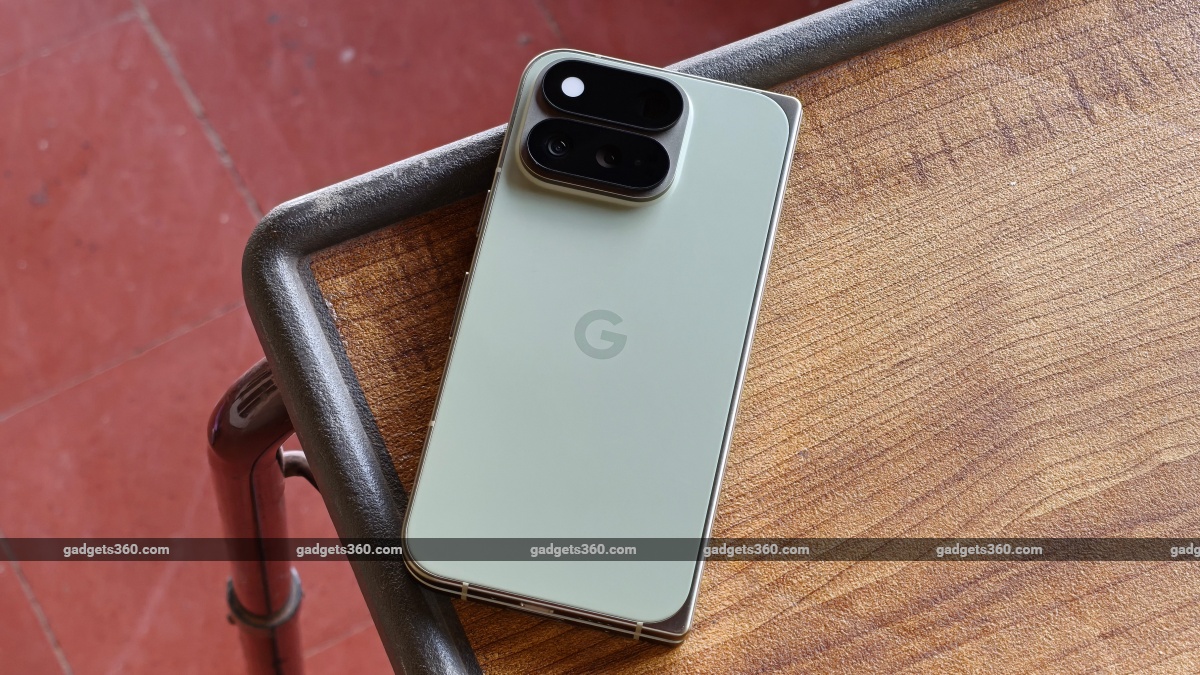
Google’s HiLight functions like a traditional LED Android notification lamp
Click Here to Add Gadgets360 As A Trusted Source
Advertisement
Google introduced its new hardware feature called HiLight with the launch of its Pixel 11 Pro series of devices. These devices feature a special RGB LED notification light placed inside the rear camera module and replaced the thermometer sensor, which had been a staple on the Pro models since the Pixel 8 Pro. HiLight wasn't well-received in our Pixel 11 Pro reviews because of its limited support. Turns out Google has been working to make it available in more apps and the recent November Pixel Drop did add some additional capability versus what was mentioned in its official changelog.
Pixel Drop Secretly Adds WhatsApp Message Notification HiLight Support
According to 9to5Google, the recent Pixel Drop which was made available on 10 November, brought several interesting features to new and existing Pixel smartphones. Among these, was an update for HiLight, which basically added Google Messages support for the Pixel 11 Pro series.
As it turns out, HiLight also gets WhatsApp message notifications meaning that users will be able to see a custom alert for when a WhatsApp message arrives. Earlier, WhatsApp only supported HiLight alert notifications for incoming calls. Indeed, this new addition along with support for Google Messages (the default SMS handling app) does make the hardware feature a lot more useful.
Unlike the traditional Android LED lamp, which was also used for notifications on older smartphones, the Pixel HiLight feature is a bit different. The hardware itself isn't a single LED lamp, but an array of RGB LEDs. This gives the HiLight lamp a soft multicoloured glow, much like what's going on with Google's Gemini interface on Android 17. The colours displayed can be customised depending on app support.
Google's HiLight feature was initially used for incoming alerts when certain contacts called. These colours were customisable. HiLight also lights up when Gemini is summoned on a Pixel 11 Pro series device (when face down), giving users a hint that Gemini is active and listening. A third-party developer recently built an app called HiLight Studio, which basically unlocks HiLight's potential letting you display custom patterns and effects. Sadly, it isn't available in the Play Store and needs shell-level access (CLI) to a Pixel lights service, which will need setting up via Shizuku or ADB.

- REVIEW
- KEY SPECS
- NEWS
- Good
- Improved slimmer and lighter design
- Only Android foldable with an IP68 durability
- Bright and vibrant displays
- Rambler is life-changing
- App Bubbles can help you focus
- Only Android foldable with magnetic wireless charging
- 7-year software update commitment
- Bad
- HiLight is not very useful at the moment
- One-day battery life
- Poor ultrawide camera
- Average video recording quality
Read detailed Google Pixel 11 Pro Fold review
Display (Primary) 8.00-inch
Cover Display 6.50-inch
Cover Resolution 1080x2342 pixels
Front Camera 10-megapixel + 10-megapixel
Rear Camera 48-megapixel + 10.5-megapixel + 10.8-megapixel
RAM 16GB
Storage 512GB
Battery Capacity 4,806mAh
OS Android 17
Resolution 2,076x2,152 pixels

- KEY SPECS
- NEWS
Display 6.30-inch
Processor Google Tensor G6
Front Camera 42-megapixel
Rear Camera 50-megapixel + 48-megapixel
RAM 12GB
Storage 256GB, 512GB
Battery Capacity 4850mAh
OS Android 17
Resolution 1280x2856 pixels

- REVIEW
- KEY SPECS
- NEWS
- Good
- Stunning design
- Fantastic display
- Magic Capture is genuinely excellent
- Rambler is one of the best voice-typing tools on Android, full stop
- Solid cameras
- 7 years of OS updates
- Bad
- More expensive than last year (Pro XL model)
- Google AI Pro is now bundled for 6 months instead of a full year
- HiLight is more of a design element than a useful feature, with no third-party app support
- Not built for serious gaming
- Wired charging still behind the competition
Read detailed Google Pixel 11 Pro XL review
Display 6.80-inch
Processor Google Tensor G6
Front Camera 42-megapixel
Rear Camera 50-megapixel + 48-megapixel
RAM 12GB, 16GB
Storage 256GB, 512GB
Battery Capacity 5115mAh
OS Android 17
Resolution 1344x2992 pixels
Comments
Get your daily dose of tech news, reviews, and insights, in under 80 characters on Gadgets 360 Turbo. Connect with fellow tech lovers on our Forum. Follow us on X, Facebook, WhatsApp, Threads and Google News for instant updates. Catch all the action on our YouTube channel.
Further reading:
Google Pixel HiLight, Google Pixel 11 Pro, Google Pixel 11 Pro XL, Google Pixel 11 Pro Fold

Related Stories


Pixel Drop Secretly Adds WhatsApp Message Notification HiLight Support to PIxel 11 Pro Series


Advertisement
Follow Us


-
Best Velvet Clutches Under ₹1,500 to Match Festive and Wedding Outfits
-
Best Dishwashers for Small Families & Bachelors with 8 Place Settings
-
Best 3D Printers in India for Beginners, Hobbyists, and High-Speed Home Prototyping
-
Best Haier Heavy-Duty Cooling ACs for High Ambient Temperatures
-
Best Ayurvedic Chyawanprash, Honey, and Immunity Boosters for Winter
Advertisement
Popular on Gadgets
- Samsung Galaxy S26 Ultra
- Motorola Razr Fold
- ChatGPT
- OPPO Find N6
- Mobiles Under Rs. 40,000
- Vivo X300 Ultra
- Asus Zenbook S14
- iQOO 15
- Vivo X300 Pro
- Lenovo Yoga Slim 7i Aura Edition
- iQOO 15R
- Vivo X Fold 5
- Sony PlayStation 5
- HP OmniPad 12
- OnePlus Nord CE 6 Lite
- OnePlus Pad 4
- OPPO F33 Pro 5G
- Cryptocurrency
- HP OmniBook Ultra 14 (2026)
- iPhone 17
- Eureka Forbes AP 355 Room Air Purifier
- Latest Mobile Phones
- Compare Phones
Latest Gadgets
- Vivo Y6k
- Karbonn Rebel
- Karbonn Rebel Pro
- OnePlus Turbo 6Vs
- Redmi M100 Pro
- OnePlus Ace 7 Pro
- OnePlus Ace 7
- Samsung W27
- Dell 14S (2026)
- HP ProBook 4 G2iS 14
- Infinix Xpad 30
- iPad mini (2026)
- Moto Watch 2 Fit
- Pebble Qore 2
- Toshiba 65-Inch 4K Ultra HD Smart Mini LED QLED TV (65Z670SP)
- Haier M70 Mini LED 65-inch
- Acer Predator Atlas 8
- Asus ROG Ally
- Blue Star 1.5 Ton 5 Star Inverter Split AC (IE518ZNURS)
- Blue Star 2 Ton 3 Star Inverter Window AC (WIE324L)

- About Us
- Sitemaps
- Feedback
- Archives
- Contact Us
- RSS
- Advertise
- Career
- Privacy Policy
- Ethics
- Editorial Policy
- Terms & Conditions
- Complaint Redressal
Download Our Apps
Available in Hindi
© Copyright Red Pixels Ventures Limited 2026. All rights reserved.
-
 Apple Watch Series 12
Starts from ₹56,900
-
 Samsung Galaxy Watch Ultra 2
Starts from ₹58,949
-
 Samsung Galaxy Watch 9 (44mm, LTE)
Starts from ₹41,999
-
 Samsung Galaxy Watch 9 (40mm, LTE)
Starts from ₹38,999
-
 Samsung Galaxy Watch 9 (40mm)
Starts from ₹36,999
-
 Samsung Galaxy Watch 9 (44mm)
Starts from ₹40,999
-
 Jio to Reportedly Start Blocking Incoming Calls for Subscribers Who Do Not Recharge Their SIM
-
 Apple's New Health AI Study Lets iPhone Users Ask Medical Questions and Share HealthKit Data
-
 Microsoft Finally Explains Why Major Outlook, Microsoft 365 Outage Happened
-
 Coinone Warns of Potential Exposure of Passwords, IDs, and Crypto Wallet Addresses