
-
 Google Pixel 10 Users Can Now Play Steam Games Offline via GameNative 0.9.03 April 2026
 -
Google Vids Will Now Let All Users Generate Veo 3.1 AI Videos for Free, New Features Added3 April 2026
-
Google Introduces Gemma 4 Open-Source AI Model, Enables Building Autonomous Agents3 April 2026
-
Android 17 Beta 3 Update to Bring Notification Rules With Granular Control for Apps, Contacts: Report3 April 2026
-
Google Pixel 11 Pro XL Leaked CAD Renders Reveal Design Identical to Pixel 10 Pro XL3 April 2026
Google Reportedly Expands Gemini Split-Screen Feature to Non-Foldable Smartphones
In the split-screen view, the Gemini app for Android can reportedly turn on screen sharing to analyse content on the second app.
Written by Akash Dutta, Edited by Ketan Pratap | Updated: 17 February 2026 11:40 IST

So far, screen sharing only worked with the Gemini overlay or via Gemini Live
Click Here to Add Gadgets360 As A Trusted Source


Advertisement
Google is reportedly expanding the split-screen compatibility of the Gemini app to non-foldable smartphones. As per the report, Gemini can now operate side-by-side in the split-screen mode even on regular handsets. So far, this capability has been limited to larger displays, such as foldables and tablets. But it appears that the Mountain View-based tech giant is slowly expanding it to all devices. The multi-tasking feature reportedly also lets users share their screen and ask the artificial intelligence (AI) chatbot questions about the second app in the split view.
Gemini in Split-Screen Mode Could Be Coming to Regular Smartphones
According to an Android Authority report, the tech giant is slowly expanding Gemini's split-screen compatibility. Currently, non-foldable phone users can still open the Gemini app in split-screen view. However, the functionality is very limited, and users cannot use two apps side-by-side when one of them is Gemini.
However, the report claims that with the latest Google app version 17.5.42.ve.arm64, this is changing. The publication tested the feature on a Pixel 9 and found that the Gemini app can be opened side-by-side in the split-screen view. Not only that, but it is also said that a new feature activates when the AI assistant enters this mode.
The report claims that instead of a blank screen, users will see a new option on the home screen of the app dubbed “Share screen and app content.” Activating this button will let Gemini see what's open on the other app and answer queries about the app and the content displayed on the screen. This screen share support is said to be smoother than the overlay option that blocks the screen while Gemini answers queries.
As per the report, the feature has two different behaviours depending on whether a browser is the second app or not. For browsers or similar apps, Gemini reportedly captures the URL and answers questions based on that. However, if the app is not web-based, then the AI assistant takes a screenshot and analyses the visual information to answer questions. During the latter, it also blacks out its own interface so that the AI is not confused.
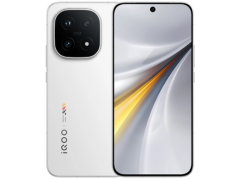
Do note, Gadgets 360 staff members were not able to spot the feature on their devices, including the recently launched iQOO 15. It could be that the tech giant is slowly expanding the feature to more devices; however, unless Google makes an announcement, it cannot be said for sure that the company plans to expand it beyond Pixel phones at this time.
- REVIEW
- KEY SPECS
- NEWS
- Good
- Brighter, smoother AMOLED display
- Excellent all-round performance
- Cleaner, refined software experience
- Improved cameras
- Solid battery life
- Bad
- Noticeably thick bottom bezel
- Black levels are not deepest
- Inconsistent low-light portraits
Read detailed iQOO 15 review
Display 6.85-inch
Processor Snapdragon 8 Elite Gen 5
Front Camera 32-megapixel
Rear Camera 50-megapixel + 50-megapixel + 50-megapixel
RAM 12GB, 16GB
Storage 256GB, 512GB
Battery Capacity 7,000mAh
OS Android 16
Resolution 1,440x3,168 pixels
- REVIEW
- KEY SPECS
- NEWS
- Good
- Flagship build and design
- Excellent display
- Great cameras
- Good battery life
- AI features are fun
- Bad
- Processor is still not great
- Heats up
- No longer compact
Read detailed Google Pixel 9 review
Display 6.30-inch
Front Camera 10.5-megapixel
Rear Camera 50-megapixel + 48-megapixel
RAM 12GB
Storage 256GB
Battery Capacity 4700mAh
OS Android 14
Resolution 1080x2424 pixels
Comments
Get your daily dose of tech news, reviews, and insights, in under 80 characters on Gadgets 360 Turbo. Connect with fellow tech lovers on our Forum. Follow us on X, Facebook, WhatsApp, Threads and Google News for instant updates. Catch all the action on our YouTube channel.
Related Stories




Advertisement
Follow Us




-
05:05
Goboult Mustang Racer Smartwatch Review: Should You Get This Mustang Smartwatch? -
04:58
OnePlus Nord Buds 4 Pro Review: Specs, Sound Quality, ANC, and Battery Backup Tested -
02:29
[Sponsored] Samsung Galaxy S26 Ultra First Look: AI Smartphone for Creators, Gaming & Productivity -
04:25
Vivo X200T Review - Full Camera, Gaming & Battery Test | Worth Buying? -
28:31
The Future of Productivity: Logitech's Anatoliy Polyanker On AI, Hybrid Work, And India's Tech Boom
-
Redmi 15A 5G की सेल शुरू, जानें कितने में मिल रहा 6300mAh बैटरी वाला फोन
-
7300mAh बैटरी, 50MP कैमरा वाले OnePlus फोन पर बंपर डिस्काउंट, जानें
-
Zepto बेच रहा 24 हजार रुपये सस्ता iPhone 17 Pro Max, सबसे तगड़ा डिस्काउंट
-
Infinix GT 50 Pro होगा धांसू गेमिंग फोन, यूनीक डिजाइन के साथ फीचर्स लीक
-
8 हजार सस्ता खरीदें Samsung का 6000mAh बैटरी, 50MP कैमरा वाला फोन
Advertisement
Popular on Gadgets
- Samsung Galaxy Unpacked 2026
- iPhone 17 Pro Max
- ChatGPT
- iOS 26
- Laptop Under 50000
- Smartwatch Under 10000
- Apple Vision Pro
- Oneplus 12
- OnePlus Nord CE 3 Lite 5G
- iPhone 13
- Xiaomi 14 Pro
- Oppo Find N3
- Tecno Spark Go (2023)
- Realme V30
- Best Phones Under 25000
- Samsung Galaxy S24 Series
- Cryptocurrency
- iQoo 12
- Samsung Galaxy S24 Ultra
- Giottus
- Samsung Galaxy Z Flip 5
- Apple 'Scary Fast'
- Housefull 5
- GoPro Hero 12 Black Review
- Invincible Season 2
- JioGlass
- HD Ready TV
- Latest Mobile Phones
- Compare Phones
Latest Gadgets
- Honor Play 80
- Nord 6
- Honor X80i
- Honor Play 80 Pro
- Redmi Note 15 SE 5G
- Redmi A7 Pro
- OPPO K15 Pro
- OPPO K15 Pro+
- Xiaomi Book Pro 14
- MacBook Neo
- Vivo Pad 6 Pro
- Lenovo Legion Y700 Gen 5
- boAt Valour Watch 1R
- Xiaomi Watch S5
- Xiaomi QLED TV X Pro 75
- Haier H5E Series
- Asus ROG Ally
- Nintendo Switch Lite
- Haier 1.6 Ton 5 Star Inverter Split AC (HSU19G-MZAID5BN-INV)
- Haier 1.6 Ton 5 Star Inverter Split AC (HSU19G-MZAIM5BN-INV)

- About Us
- Sitemaps
- Feedback
- Archives
- Contact Us
- RSS
- Advertise
- Career
- Privacy Policy
- Ethics
- Editorial Policy
- Terms & Conditions
- Complaint Redressal
Download Our Apps
Available in Hindi
© Copyright Red Pixels Ventures Limited 2026. All rights reserved.