

-
 Google Pixel 10 Users Can Now Play Steam Games Offline via GameNative 0.9.03 April 2026
 -
Google Vids Will Now Let All Users Generate Veo 3.1 AI Videos for Free, New Features Added3 April 2026
-
Google Introduces Gemma 4 Open-Source AI Model, Enables Building Autonomous Agents3 April 2026
-
Android 17 Beta 3 Update to Bring Notification Rules With Granular Control for Apps, Contacts: Report3 April 2026
-
Google Pixel 11 Pro XL Leaked CAD Renders Reveal Design Identical to Pixel 10 Pro XL3 April 2026
- Home
- Mobiles
- Mobiles News
- Google Rolls Out First Android 17 Beta Update With Performance Optimisation Tools: Features, Compatible Models
Google Rolls Out First Android 17 Beta Update With Performance Optimisation Tools: Features, Compatible Models
Android 17 introduces subtle interface polish, including improvements regards to smoother system animations and refinements to notifications.
Written by Shaurya Tomer, Edited by Ketan Pratap | Updated: 14 February 2026 14:06 IST
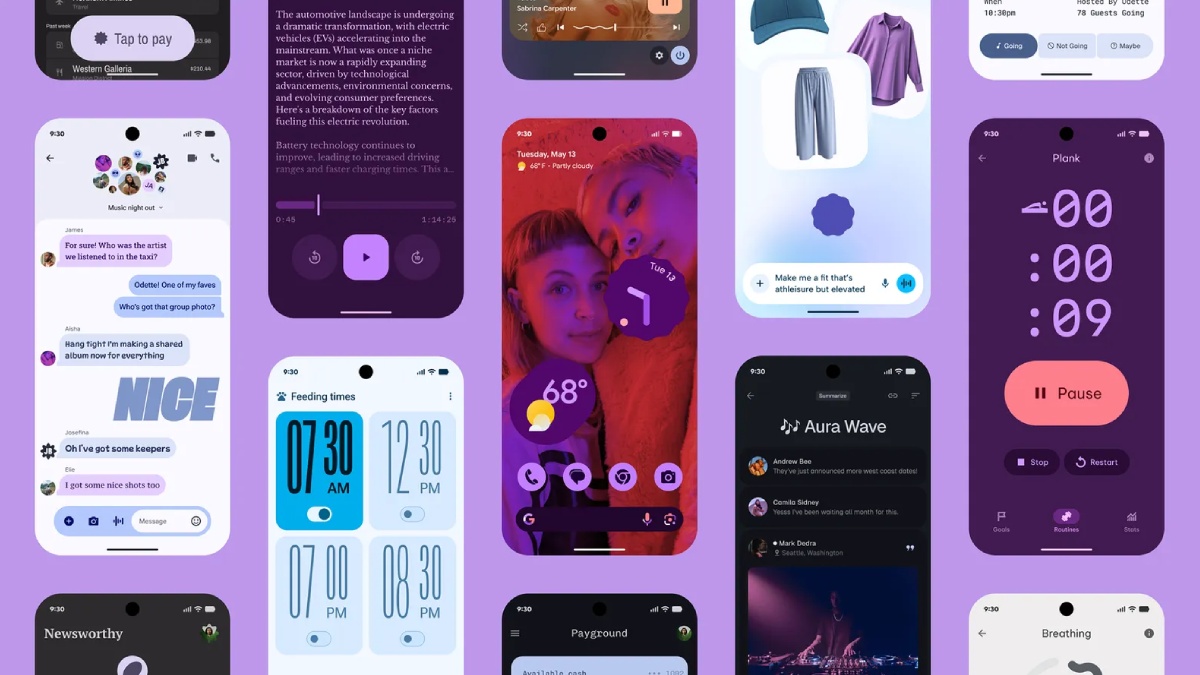
Photo Credit: Google
Android 17 Beta 1 also expands privacy and security controls, as per Google
Click Here to Add Gadgets360 As A Trusted Source

Advertisement
Google on Friday released the first public beta of Android 17, giving public users and developers an early look at the next major version of its mobile operating system. As per the Mountain View-based tech giant, the update introduces a range of refinements focused on performance, privacy, and developer tools. Google also highlighted a fundamental shift in the way new releases are introduced to the developer community, replacing the traditional "Developer Preview" with a continuous Canary channel.
Android 17 Beta 1 Update: What's New
According to Google, Android 17 continues its push toward performance optimisation and smoother user experiences. The first beta includes under-the-hood improvements aimed at better background task management and enhanced power efficiency. The tech giant says its new update includes system-level changes that help apps run more efficiently, particularly in multitasking scenarios.
Android 17 Beta 1 also expands privacy and security controls. The update brings refinements to permission management, giving users clearer visibility into how apps access sensitive data such as location, microphone, and camera inputs. Professional-grade tools have been introduced for media and camera apps, with features like seamless transitions and standardised loudness.
There is added support for Versatile Video Coding (VVC) standard, audio framework enforces restrictions on background audio interactions including audio playback, audio focus requests, and volume change APIs. As per the company, this move ensures that these changes are started intentionally by the user.
On the UI front, Android 17 introduces subtle interface polish, including improvements regards to smoother system animations and refinements to notifications and quick settings behaviour. Google says it has also enhanced support for large-screen devices, with the removal of opt-out for orientation and resizability restrictions on large screen devices, ensuring better scaling and layout adaptability for foldables and tablets.
Apart from this, the update enforces restrictions on size of custom notification views, to reduce the memory usage. As per the company, this closes a loophole which previously allowed apps to bypass existing limits using URIs. This behaviour is gated by the target SDK version and takes effect for apps targeting API 37 and higher.
How to Install Android 17 Beta on Pixel Phones
Android 17 Beta 1 is available for supported Pixel smartphones enrolled in the Android Beta Programme. These range from the latest Pixel 10 series to the Pixel 6 models. To install the update:
- Visit the Android Beta Programme website and sign in with your Google account
- Select your eligible Pixel device and opt into the programme
- Once enrolled, navigate to Settings > System > Software Update on your phone
- Check for updates and download Android 17 Beta 1 when it appears
After installation, the device will receive future beta updates over the air (OTA). Users should note that beta software may contain bugs or stability issues, and it is generally recommended for developers or advanced users rather than primary devices.
- REVIEW
- KEY SPECS
- NEWS
- Good
- Solid and premium design
- Bright display
- AI smart features on board
- Decent primary camera
- Seven years of software support
- Bad
- Limited to a single 256GB storage only
- Tensor G5 is underwhelming
- Battery life could have been better
- Not massive upgrades compared to Pixel 9
Read detailed Google Pixel 10 review
Display 6.30-inch
Front Camera 10.5-megapixel
Rear Camera 48-megapixel + 13-megapixel + 10.8-megapixel
RAM 12GB
Storage 256GB
Battery Capacity 4970mAh
OS Android 16
Resolution 1080x242 pixels
- KEY SPECS
- NEWS
Display 6.40-inch
Processor Google Tensor
Front Camera 8-megapixel
Rear Camera 50-megapixel + 12-megapixel
RAM 8GB
Storage 128GB, 256GB
Battery Capacity 4614mAh
OS Android 12
Resolution 1080x2400 pixels
Comments
Get your daily dose of tech news, reviews, and insights, in under 80 characters on Gadgets 360 Turbo. Connect with fellow tech lovers on our Forum. Follow us on X, Facebook, WhatsApp, Threads and Google News for instant updates. Catch all the action on our YouTube channel.
Related Stories



Google Rolls Out First Android 17 Beta Update With Performance Optimisation Tools: Features, Compatible Models


Advertisement
Follow Us




-
05:05
Goboult Mustang Racer Smartwatch Review: Should You Get This Mustang Smartwatch? -
04:58
OnePlus Nord Buds 4 Pro Review: Specs, Sound Quality, ANC, and Battery Backup Tested -
02:29
[Sponsored] Samsung Galaxy S26 Ultra First Look: AI Smartphone for Creators, Gaming & Productivity -
04:25
Vivo X200T Review - Full Camera, Gaming & Battery Test | Worth Buying? -
28:31
The Future of Productivity: Logitech's Anatoliy Polyanker On AI, Hybrid Work, And India's Tech Boom
Advertisement
Popular on Gadgets
- Samsung Galaxy Unpacked 2026
- iPhone 17 Pro Max
- ChatGPT
- iOS 26
- Laptop Under 50000
- Smartwatch Under 10000
- Apple Vision Pro
- Oneplus 12
- OnePlus Nord CE 3 Lite 5G
- iPhone 13
- Xiaomi 14 Pro
- Oppo Find N3
- Tecno Spark Go (2023)
- Realme V30
- Best Phones Under 25000
- Samsung Galaxy S24 Series
- Cryptocurrency
- iQoo 12
- Samsung Galaxy S24 Ultra
- Giottus
- Samsung Galaxy Z Flip 5
- Apple 'Scary Fast'
- Housefull 5
- GoPro Hero 12 Black Review
- Invincible Season 2
- JioGlass
- HD Ready TV
- Latest Mobile Phones
- Compare Phones
Latest Gadgets
- Honor Play 80
- Nord 6
- Honor X80i
- Honor Play 80 Pro
- Redmi Note 15 SE 5G
- Redmi A7 Pro
- OPPO K15 Pro
- OPPO K15 Pro+
- Xiaomi Book Pro 14
- MacBook Neo
- Vivo Pad 6 Pro
- Lenovo Legion Y700 Gen 5
- boAt Valour Watch 1R
- Xiaomi Watch S5
- Xiaomi QLED TV X Pro 75
- Haier H5E Series
- Asus ROG Ally
- Nintendo Switch Lite
- Haier 1.6 Ton 5 Star Inverter Split AC (HSU19G-MZAID5BN-INV)
- Haier 1.6 Ton 5 Star Inverter Split AC (HSU19G-MZAIM5BN-INV)

- About Us
- Sitemaps
- Feedback
- Archives
- Contact Us
- RSS
- Advertise
- Career
- Privacy Policy
- Ethics
- Editorial Policy
- Terms & Conditions
- Complaint Redressal
Download Our Apps
Available in Hindi
© Copyright Red Pixels Ventures Limited 2026. All rights reserved.