-
 Best Smartphones Under Rs. 45,000 with Snapdragon Processor: Redmi Note 17 Pro, OnePlus Nord 6 and More18 October 2026
 -
Best Phones With 256GB Storage Under Rs. 30,000 in India: Vivo T5 Lite 5G, Redmi Note 15 SE 5G, More2 October 2026
-
Best Camera Phones Under Rs. 30,000 in India: Samsung Galaxy F70 Pro 5G, Motorola Edge 70 Fusion, More13 September 2026
-
Motorola Edge 70 Fusion, Edge 60 Fusion Prices Could Rise by Rs. 3,000 in India24 August 2026
-
Best Phones With 144Hz Display Under Rs. 30,000 in India: Realme 16x 5G, Motorola Edge 70 Fusion, More22 August 2026
- Home
- Mobiles
- Mobiles Reviews
- Motorola Edge 70 Fusion Review: A Brand New Fusion, but Can It Be an All Rounder?
Motorola Edge 70 Fusion Review: A Brand-New Fusion, but Can It Be an All-Rounder?
Motorola’s new Edge 70 Fusion has a brand-new design with refreshed hardware. Our review explores whether it has what it takes to beat the competition.
Written by Sheldon Pinto, Edited by Ketan Pratap | Updated: 21 April 2026 09:40 IST

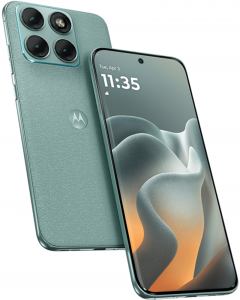
The Motorola Edge 70 Fusion is priced from Rs. 26,999 in India
Click Here to Add Gadgets360 As A Trusted Source

 Motorola Edge 70 Fusion FAQs
Advertisement
The mid-range or the sub-Rs. The 30,000 smartphone segment has seen a lot of action lately. This is partially due to the ongoing memory crisis, in which previously launched devices saw a minor price bump, moving them out of the sub-Rs. 25,000 segment to the sub Rs. 30,000 segment. Then there are the new smartphones that have been launched with the cost-cutting of the memory crisis in mind. While it is getting tougher for smartphone brands to deliver good, value-for-money products under Rs. 30,000 this year, the obvious shortcut is to focus on the basics that made the segment.
India's mid-range smartphone segment has traditionally been more about design than innovation or raw performance. Camera performance, too, was a vital mid-range feature, but over the past few years has been losing importance in favour of better battery life and bigger or faster displays. The newly launched Motorola Edge 70 Fusion follows this philosophy. It gets a refreshed design, one that's in line with the skinny Edge 70 and the Signature, and it attempts to offer better value by going with a new camera sensor and a bigger battery. But is this enough to take on the competition? And can the Motorola Edge 70 Fusion be the go-to mid-range all-rounder we have been waiting for?
Motorola Edge 70 Fusion Design: Fresh and Compelling
- Dimensions - 162.76 x 75.60 x 7.99mm
- Weight - 193g
- Durability - IP68+IP69, MIL-STD 810H
The Motorola Edge 70 Fusion is a big departure from the previous Fusion models. It has a fresh design that looks different even next to the recently launched mid-range Edge 70 and the flagship Signature model. While its camera module on the rear resembles the above-mentioned devices, it provides some additional variety with new finishes and textures. There's a rounded, “quad-curved” appearance for its front and rear panels. This, along with a quad-curved display, makes it appear and feel quite different from its recent offerings.
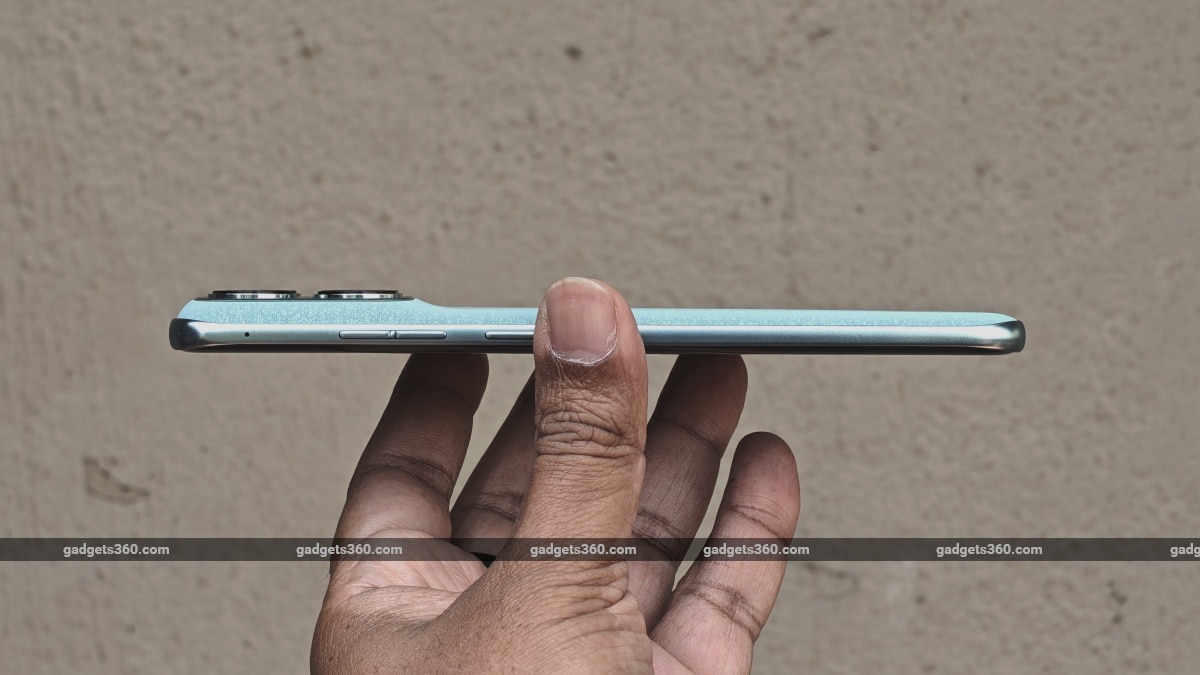
The Motorola Edge 70 Fusion has a fairly slim and rounded design that not only looks great but feels comfortable to hold
The handset was announced at MWC 2026, where it was presented in two variants. There was a thinner variant of the Edge 70 Fusion (for European markets) with a smaller 5,200mAh battery, and a thicker one with a 7,000mAh battery (for India).
The Edge 70 Fusion, available in India, is still a bit slimmer (7.99mm) than the Edge 60 Fusion (8.25mm), despite having a larger battery. The reason for its slim profile is the use of silicon-carbon battery technology, which is now common in this segment. However, the Edge 70 Fusion is not as skinny as the Edge 70 (5.99mm).
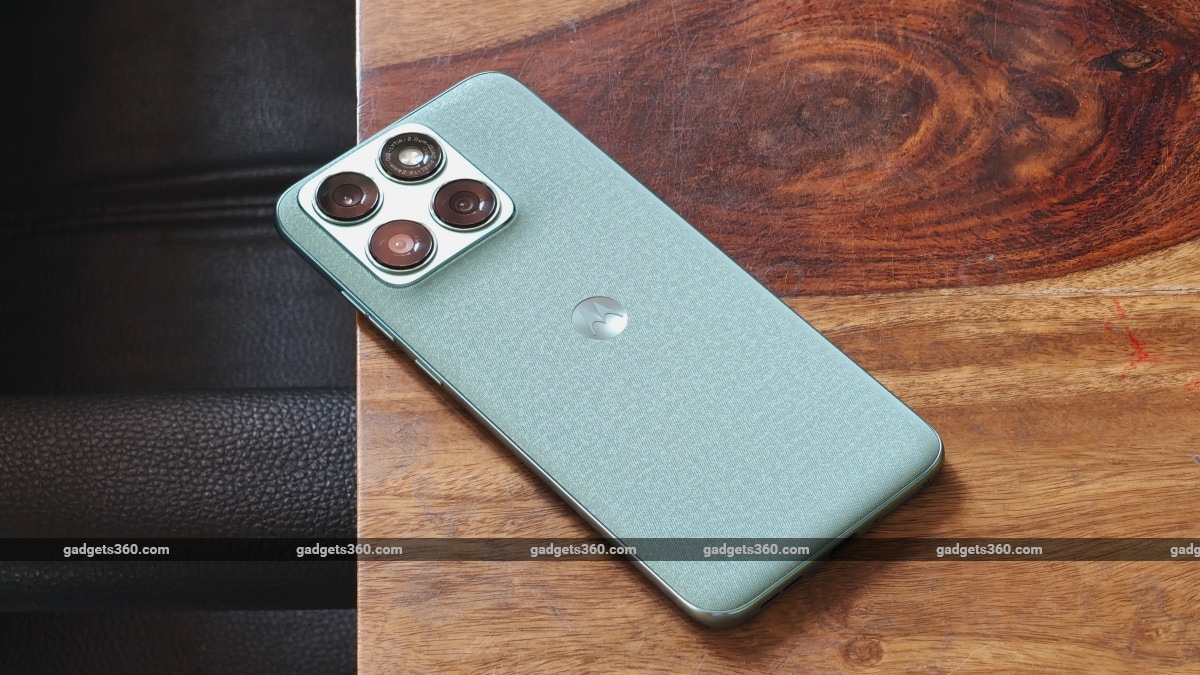
I'm not a fan of the Pantone Blue Surf with its rough fabric finish
Comparisons aside, I love the quad-curved design of the Edge 70 Fusion. It has wider corners, and despite its quad-curved front and rear panels, only the top and bottom sides of its frame are curved, while the sides are flat. And because of this, the device does not dig into your palm while providing fine edges to grip on the sides. There's also its weight, which has increased by 12 grams. The Motorola Edge 70 Fusion's weight gain strangely isn't noticeable despite the higher battery capacity and the fact that the phone has grown wider than the previous model, because of extensive use of polycarbonate, which keeps things light. Basically, it does not feel as heavy as it looks.
I received the Pantone Blue Surf finish for review, and I'm not a fan of its slightly rough fabric finish, which felt very synthetic and reminded me of Apple's tryst with its terrible Finewoven accessories that were overpriced and did not feel premium. I expect this one to get stained over rough use as well. The Pantone Silhouette and Pantone Country Air are definitely more appealing thanks to their grippy textures. Motorola claims that all of these finishes or colour options can withstand water submersion, but don't expect it to be covered under warranty.
Motorola Edge 70 Fusion Display: Big and Bright
- Display size - 6.8-inch, 1,272 x 2,772 pixels, 450 PPI
- Display type - 10-bit, AMOLED, 144Hz (60-90-120Hz)
- Display protection - Corning Gorilla Glass 7i
It is good that the display beneath the quad-curved glass does not curve aggressively toward the sides. But its curved glass screen does present some unneeded reflections on the inside of the curved edges when outdoors. These aren't much of a problem, as the display is bright enough to tackle the afternoon sun and can be viewed comfortably outdoors in this environment. The borders are skinny too, but more on the sides versus the top and bottom.
Motorola claims its display can reach up to 144Hz, but in our testing, the system only manages refresh rates between 60, 90, and 120Hz (as seen in Developer options). In Smart and balanced mode, the refresh rate settles at 60Hz when not in use and cranks up to 90 or 120Hz, depending on the app. In Hyper smooth mode, it settles at 60Hz as well, but cranks up to 120Hz when in use across apps. Indeed, the latter offers smoother visuals when interacting with the software.
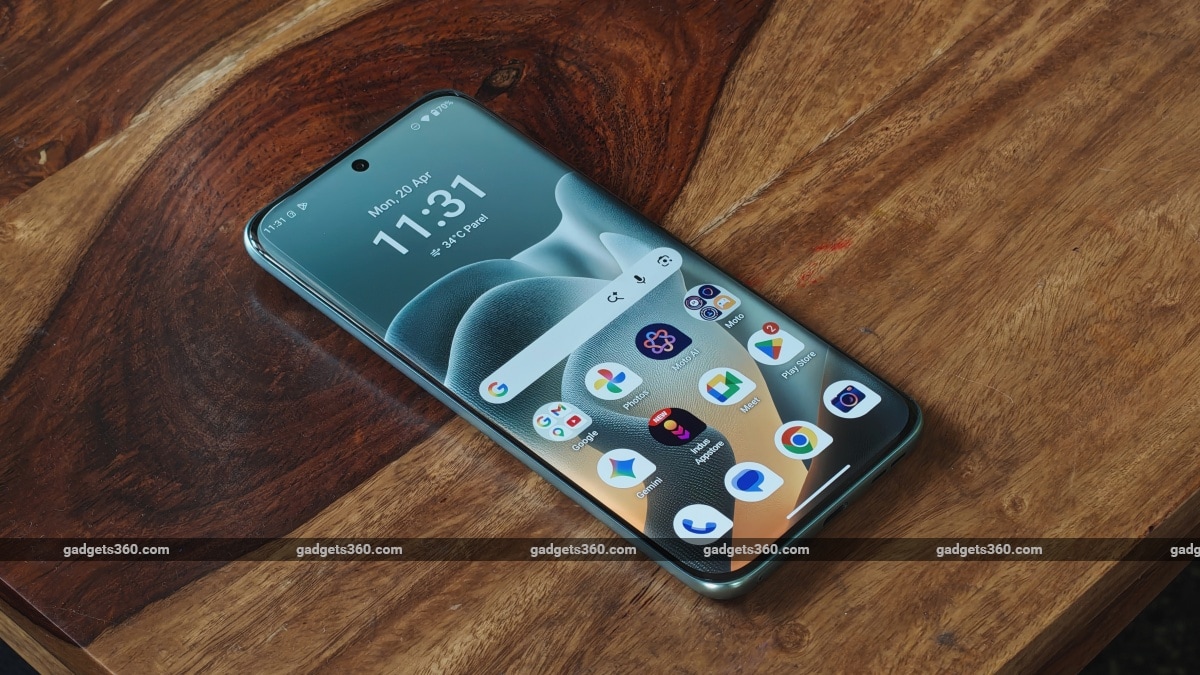
The Edge 70 Fusion has a quad-curved display that gets sufficiently bright outdoors
While Motorola claims that the device supports HDR10+, I could not find any supported content on Netflix (also lacked official support) at the time of writing this review. The same applies to the YouTube app, which shows HDR options (under quality), but the display did not appear bright and contrasted. Standard definition content appeared sharp because the device supports Widevine L1.
During the review, the Fusion's display did not pick up any fingerprints or smudges, but unlike flat displays, you will not be able to apply a screen protector to it in case you are the clumsy type.
Motorola Edge 70 Fusion Software: Intuitive but Intrusive
- Android version - 16
- Software - Hello UI
- Software commitment - 3 years of OS updates + 5 years of SMRs
Motorola's software experience appears quite stock and Spartan. Everything is where stock Android users would expect it to be. Smoothness is on point, provided you stick to the Hyper smooth screen refresh rate mode. But with every passing year comes a bit more bloat. While I wasn't greeted with spammy notifications during the review, the Indus Appstore (which is also present on Xiaomi devices) has made its way here.
A new ‘App picks' feature also makes its way to the app drawer. It encourages users to download apps from an external source, but after agreeing to its terms and tapping on this icon (indicated by a bottom-facing arrow), all I got was a transparent window which blocked access to the apps in the app drawer. Swiping back or hitting the back navigation key closes this overlay, restoring access to the app drawer.
I've mentioned this in previous Motorola reviews, but it is still annoying to see a ‘Newsfeed' tab in the app drawer. Thankfully, it does not get in your way until you activate it. And you can even hide this ‘Newsfeed' tab from the App drawer's ‘Smart Tray' settings. This is where you will also find the option to turn off the ‘App picks' feature, but both of these annoyances are switched on by default.
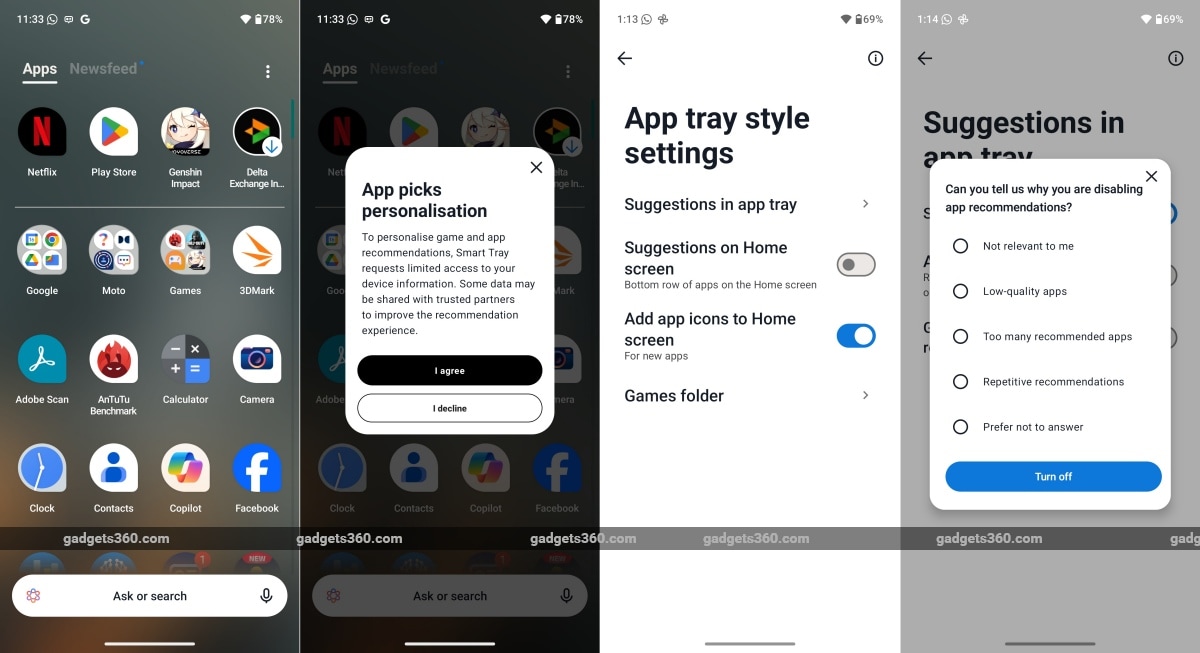
The ‘App Picks' feature suggests app downloads right in your app drawer
As usual, Motorola also offers a bunch of AI tools and options; some of these (like AI-based image editing) are handled by Google. Optionally, Perplexity AI and, now, Microsoft's Copilot are also preinstalled. Motorola's Moto AI is available on this mid-range handset along with the rest of the Moto suite of apps, but it does not get a dedicated button like on higher-priced devices.
Moto AI is as helpful as it was when it launched midway last year, but it has gotten much faster in response time. However, it still lacks the deeper integration like Google's Gemini, as it cannot find or execute commands to alter the system settings (even though it can understand them). Microsoft's Copilot Vision is now integrated into the Moto AI interface. We tried it out, but the results were not accurate. Google's Gemini Live is definitely a better choice with more accurate results.
Motorola Edge 70 Fusion Performance: Capable Performance
- Processor - Qualcomm Snapdragon 7s Gen 4, 2.7GHz, 4nm
- RAM - 8/12GB, LPDDR5
- Storage - 128/256GB
Even though Hello UI runs smoothly with no visible hiccups, the Motorola Edge 70 Fusion isn't a performer, as can be seen from the table below. Stacked against the competition, it is indeed the least powerful device.
| Benchmarks | Motorola Edge 70 Fusion | OnePlus Nord CE 5 | Realme P4 Pro |
|---|---|---|---|
| Display resolution | 1.5K | FHD+ | 1,280 x 2,800 pixels |
| Chipset | Snapdragon 7s Gen 4 (4nm) | Dimensity 8350 Ultimate (4nm) | Qualcomm Snapdragon 7 Gen 4 (4nm) |
| AnTuTu v10 | 11,35,275 | 14,12,373 | 13,44,863 |
| PCMark Work 3.0 | 13,577 | 13,435 | 18,022 |
| Geekbench 6 Single | 1,237 | 1,317 | 1,208 |
| Geekbench 6 Multi | 3,373 | 3,989 | 3,567 |
| Geekbench AI CPU (Quantized) | 1,300 | NA | 2,748 |
| Geekbench AI GPU (Quantized) | 917 | NA | 1,231 |
| 3DM Wild Life | 4,583 | Maxed Out | 6,389 |
| 3DM Wild Life Unlimited | 4,683 | 11,038 | 6,592 |
| 3DM Steel Nomad Light | 434 | NA | 682 |
The Motorola Edge 70 Fusion can barely handle heavy 3D games like Genshin Impact at Low settings. Given its modest processing power, it is better suited for running casual games and simpler titles like Call of Duty: Mobile (CODM) that can be enjoyed at Low graphics and Ultra framerates (90 fps) without any issues. CODM also performed smoothly at High Graphics and Max fps (60 fps).
Audio quality is good. The stereo speaker system gets quite loud, and Dolby Atmos helps deliver immersive sound both while playing games and watching videos.
Motorola Edge 70 Fusion Cameras: Not Bad at All
- Primary camera - 50-megapixel, f/1.8, PDAF, OIS
- Ultrawide camera - 13-megapixel, f/2.2, PDAF, 120-degree
- Selfie camera - 32-megapixel, f/2.2, FF
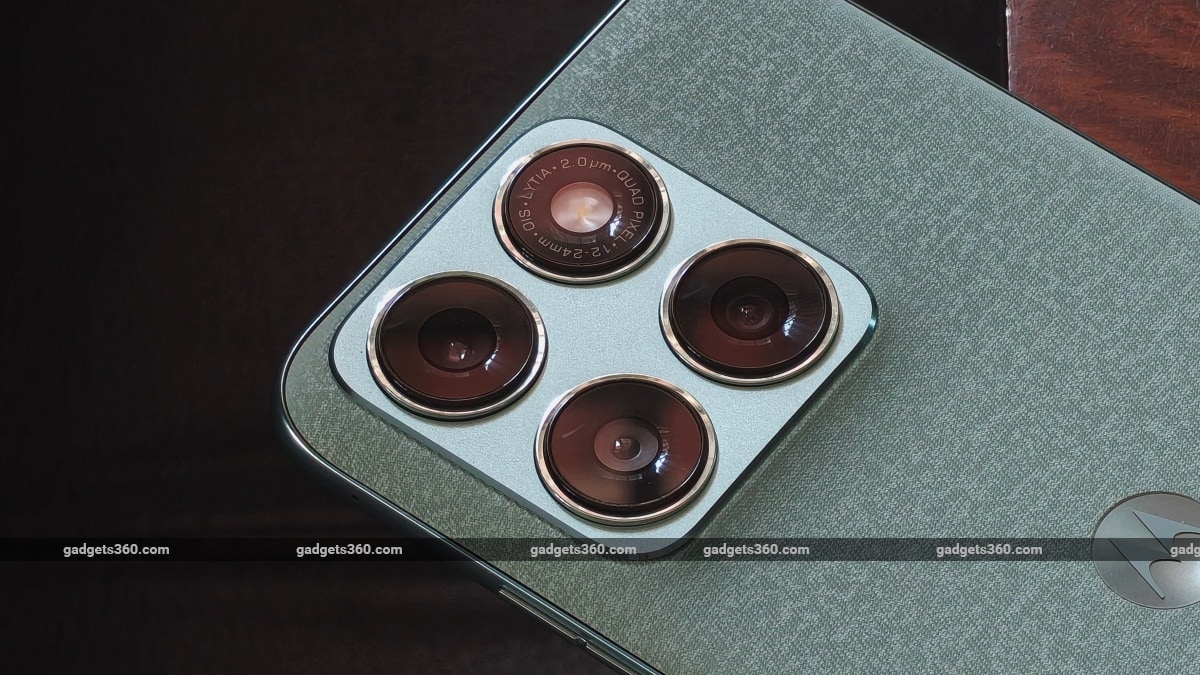
The primary camera gets a new sensor and a brighter aperture
Motorola has upgraded its Edge 70 Fusion's camera experience this year. There's a new Sony LYTIA-710 sensor backing the primary camera with a brighter aperture, but the rest of the hardware remains the same as before.


Motorola Edge 70 Fusion ultrawide camera samples (tap images to expand)
The ultrawide camera's performance is far from impressive. While you do get a wider, exaggerated field of view, the photos show very noticeable purple fringing around bright spots when shooting outdoors. The purple fringing is so bad that it can even colour certain parts of the image. As for textures and detail, it's quite average and does not meet expectations even at this price point. In low-light or street-lit settings, noise cancellation is quite aggressive, leading to blotchy textures. Dynamic range is decent, but there's aggressive processing leading to distorted patches around complex patterns.

Motorola Edge 70 Fusion macro camera samples (tap image to expand)
Thankfully, the ultrawide camera also serves a second purpose — macro photography. And out here it fares better, managing good detail and letting you get much closer to your subject than the primary camera will allow.




Motorola Edge 70 Fusion primary camera samples (tap image to expand)
I expected better from the primary camera since it is the one that has received upgrades this year, and it did not disappoint. In daylight, photos have good dynamic range, ensuring good detail in the shadows, but the camera does tend to overexpose the bright parts of a given image at times. Colours are natural, and sharpness is on point. Portrait mode photos captured using this camera also show good detail and edge detection. Low-light photos show natural colours, and dynamic range is handled well. Noise is under control, and the images have good detail, provided there is enough ambient light. In dimly lit settings, images tend to appear soft.


Motorola Edge 70 Fusion primary (2x digital zoom) camera samples (tap image to expand)
2X digital crops also pack good detail in daylight and are usable in low-light settings (slightly softer images), which is a good feature at this price point.


Motorola Edge 70 Fusion selfie camera samples (tap images to expand)
The selfie camera does a good job in daylight, managing decent detail. There is a bit of sharpening, but it does not go overboard. Dynamic range is good, and edge detection is accurate. When shooting in low light, dynamic range is fine, but the camera cannot pull out much detail, resulting in flattened facial textures.
Video quality from the primary camera is surprisingly good, provided you stick to 4K resolution, which is limited to 30 fps. The camera shows good detail and dynamic range, focusing is quick in daylight, and the bitrate is steady (but not the smoothest). In low-light settings, captured video has a bit more noise with slightly slower focusing, but is otherwise quite usable.
The 1080p video recordings lack the sharper detail of the 4K setting. The 1080p 60 fps setting has a weird bug where the camera defaults to infinity focus. Tapping on the screen to adjust or reset the focus does not work either.
Motorola Edge 70 Fusion Battery: A Lot Better Than Before
- Battery capacity - 7,000mAh, silicon-carbon (li-ion)
- Wired charging - 68W
- Charger in the box - Yes
The Motorola Edge 70 Fusion's biggest and most noticeable upgrade is its battery. Motorola has switched from a 5,500mAh battery to a substantially larger 7,000mAh unit this year. We ran our standard PCMark Work Battery Life test, and the device managed a good 21 hours and 57 minutes of continuous usage. In contrast, the previous Edge 60 Fusion model only managed 13 hours in the same test under the same conditions, meaning there are indeed very noticeable improvements in battery life. With daily use, the Edge 70 Fusion can easily last well over a day with heavy usage. Casual users can get up to two days of battery life provided they avoid the camera and don't play games.
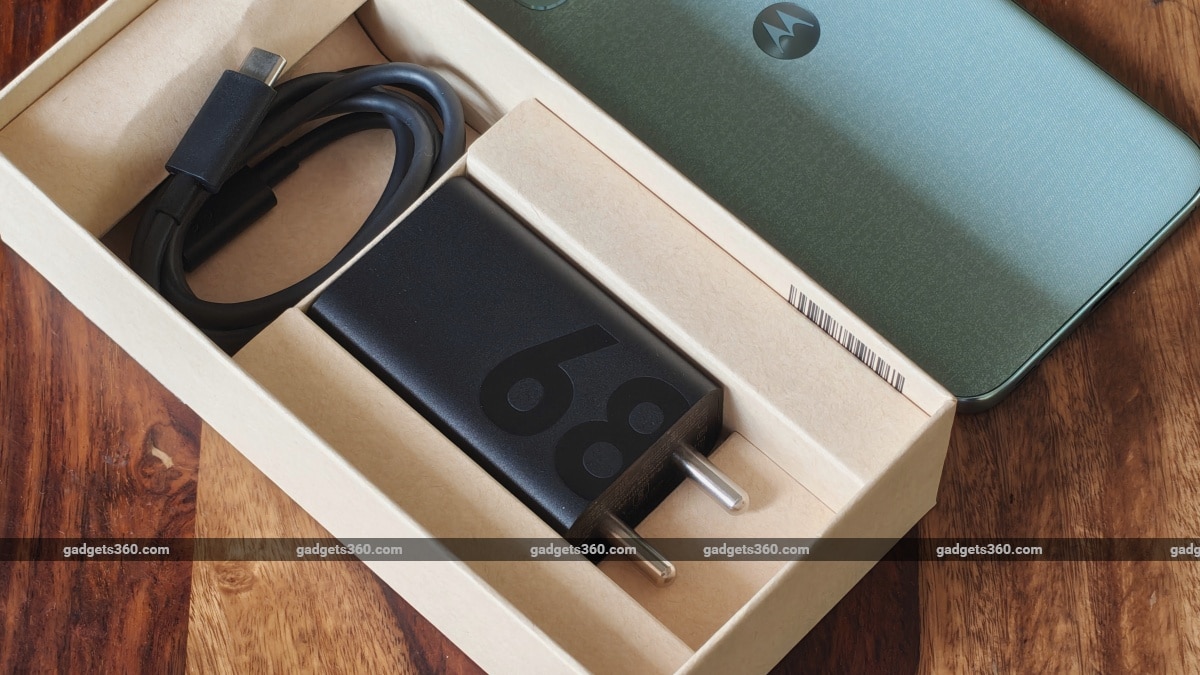
Motorola provides a 68W Type-C charger in the box
And when the battery does die out, charging it using the bundled charger is quite fast. The phone managed to charge the battery to 69 percent in 30 minutes and completed the charge in just 54 minutes with the Charge Boost feature activated.
Motorola Edge 70 Fusion Verdict
Indeed, the Motorola Edge 70 Fusion walks a fine line, but it does come close to being an all-rounder. It offers a fresh design, a processor that can handle the demands of casual users, great-sounding speakers, and a fine display. Its primary camera delivers, and battery life is great as well.
The Edge 60 Fusion's main competitor last year was the Edge 60. This year, Motorola seems to have sorted things out between its siblings by going with a super slim design for the Edge 70, which also resulted in slightly inferior camera performance compared to the older Edge 60. With the sibling rivalry now sorted, the Edge 70 Fusion (from Rs. 26,999) can finally stretch its legs and be the basic budget-to-mid-range choice for buyers of the brand.
But we cannot forget Motorola's own Edge 60 Pro from last year, which is still on sale, and still offers much better value at an additional Rs. 3,000 (Rs. 29,999). So, if you do have the extra budget, then we would recommend getting the Edge 60 Pro instead (while stocks last).
Nothing's Phone 3a is no more, while the Phone 4a was promoted to the upper end of the mid-range this year. In terms of similarly priced alternatives, there's also the OnePlus Nord CE 5 (from Rs. 24,999), which is a better choice for the gaming crowd (and everyone else) thanks to its MediaTek Dimensity 8350 Apex processor. The phone is also priced lower and offers equally good battery life, but it has only one bottom-firing speaker, which could be a deal-breaker for some.
The Realme P4 Power (from Rs. 27,999) with its mega powerbank-like 10,001mAh battery will still find its fair share of buyers at this price point. The Realme P4 Pro also delivers when it comes to its display (HDR10+ support) and gaming, which is where the Motorola falls short of expectations. But its camera performance wasn't up to the mark.
Motorola Edge 70 Fusion FAQsWhat are the main features of the Motorola Edge 70 Fusion?
The Motorola Edge 70 Fusion is available with up to 12GB of RAM paired with 256GB of internal storage. It features a dual rear camera setup comprising a 50MP main camera and a 13MP secondary sensor, along with a 32MP front-facing selfie camera. The phone supports fast charging with 68W wired charging, backed by a 7000mAh battery. It is powered by the Snapdragon 7s Gen 4 processor and comes with a 6.8-inch Extreme AMOLED display that supports up to a 120Hz refresh rate. The Motorola Edge 70 Fusion is available in 3 colour options.
When was the Motorola Edge 70 Fusion released?
The Motorola Edge 70 Fusion was launched on March 6, 2026
Where can I buy the Motorola Edge 70 Fusion?
You can buy the Motorola Edge 70 Fusion through the official Motorola website, e-commerce platforms such as Flipkart, and select retail stores across India.
- REVIEW
- KEY SPECS
- NEWS
- Good
- Light and durable design
- Bright and vibrant curved-edge display
- Loud and immersive speakers
- Capable primary camera
- Good video capture capability
- Decent macro camera
- Bad
- HDR10 support is missing
- Poor ultrawide camera
- Comes with plenty of preinstalled apps
Read detailed Motorola Edge 70 Fusion review
Display 6.80-inch
Front Camera 32-megapixel
Rear Camera 50-megapixel + 13-megapixel
RAM 8GB, 12GB
Storage 128GB, 256GB
Battery Capacity 5200mAh
OS Android Android 16
Resolution 2772x1272 pixels
Comments
Get your daily dose of tech news, reviews, and insights, in under 80 characters on Gadgets 360 Turbo. Connect with fellow tech lovers on our Forum. Follow us on X, Facebook, WhatsApp, Threads and Google News for instant updates. Catch all the action on our YouTube channel.
Further reading:
Motorola Edge 70 Fusion, Motorola Edge 70 Fusion Design, Motorola Edge 70 Fusion Display, Motorola Edge 70 Fusion Software, Motorola Edge 70 Fusion Cameras, Motorola Edge 70 Fusion Battery, Motorola Edge 70 Fusion Specifications in India
Related Stories



Advertisement
Follow Us




-
![[Sponsored] LG NANO 4K UHD AI TV NU885: Gemini Search, Dolby Atmos & 5 Years of Updates](https://www.gadgets360.com/static/desktop/images/spacer.png)
04:17
[Sponsored] LG NANO 4K UHD AI TV NU885: Gemini Search, Dolby Atmos & 5 Years of Updates -
00:57
[Sponsored] Samsung Galaxy Z Fold8 My Fan Cam in Action: Find the Moment, Then Share It -
01:41
[Sponsored] What Do You Need To Know Before Your Next Run? | Samsung Galaxy Watch Ultra2 -
01:32
[Sponsored] Big Day Tomorrow? Prep Today | Samsung Galaxy Watch Ultra2 -
04:37
[Sponsored]: CP PLUS CarKam CP-F89B: 4K Dashcam With Rear Camera, GPS & Emergency Recording
-
SBI डाटा लीक, क्या हुआ और कैसा डाटा था, अकाउंट है तो क्या करना चाहिए?
-
भारत में गिरी स्मार्टफोन की बिक्री, फोन महंगे होने से 26% कम हुई शिपमेंट
-
Lava Aura Curve 5G: 6000mAh बैटरी, 50 मेगापिक्सल कैमरा के साथ पेश, जानें
-
Redmi K100 में मिलेगा 50 मेगापिक्सल का प्राइमरी कैमरा
-
Realme लाई बजट फोन Realme C01, 6500mAh बैटरी के साथ!
Advertisement
Popular on Gadgets
- Samsung Galaxy S26 Ultra
- Motorola Razr Fold
- ChatGPT
- OPPO Find N6
- Mobiles Under Rs. 40,000
- Vivo X300 Ultra
- Asus Zenbook S14
- iQOO 15
- Vivo X300 Pro
- Lenovo Yoga Slim 7i Aura Edition
- iQOO 15R
- Vivo X Fold 5
- Sony PlayStation 5
- HP OmniPad 12
- OnePlus Nord CE 6 Lite
- OnePlus Pad 4
- OPPO F33 Pro 5G
- Cryptocurrency
- HP OmniBook Ultra 14 (2026)
- iPhone 17
- Eureka Forbes AP 355 Room Air Purifier
- Latest Mobile Phones
- Compare Phones
Latest Gadgets
- Poco X8s
- Samsung Galaxy F70 5G
- Tecno Spark 50S 5G
- Vivo Y600s Pro
- Vivo Y32 (2026)
- Infinix Smart 20 HD
- Vivo V80
- Vivo S2 FE
- HP ZBook Ultra G3a
- Dell Pro Rugged 14
- Amazon Alexa Tablet 8
- Amazon Alexa Tablet 11
- Pebble Qore 2
- Amazfit T-Rex Dual Solar
- Toshiba 65-Inch 4K Ultra HD Smart Mini LED QLED TV (65Z670SP)
- Haier M70 Mini LED 65-inch
- Acer Predator Atlas 8
- Asus ROG Ally
- Blue Star 1.5 Ton 5 Star Inverter Split AC (IE518ZNURS)
- Blue Star 2 Ton 3 Star Inverter Window AC (WIE324L)

- About Us
- Sitemaps
- Feedback
- Archives
- Contact Us
- RSS
- Advertise
- Career
- Privacy Policy
- Ethics
- Editorial Policy
- Terms & Conditions
- Complaint Redressal
Download Our Apps
Available in Hindi
© Copyright Red Pixels Ventures Limited 2026. All rights reserved.