-
 AI Impact Summit: Adobe Offers Indian Students Free Access to Photoshop, Acrobat and Firefly Apps19 February 2026
 -
Adobe Photoshop, Express and Acrobat Can Now Be Accessed Within ChatGPT11 December 2025
-
How to Convert Excel Files to PDF: A Step-by-Step Guide30 October 2025
-
Adobe Acrobat Studio Launched With PDF Spaces and Access to Adobe Express Features19 August 2025
-
Adobe Previews Agentic AI Tools Across Acrobat, Photoshop and Premiere Pro11 April 2025
Adobe Acrobat’s AI Chatbot Will Now Let You Edit PDF With Text Prompts
AI chatbot in Adobe Acrobat can now remove pages and text, add e-signatures, and more with text prompts.
Written by Akash Dutta, Edited by Rohan Pal | Updated: 23 January 2026 11:31 IST
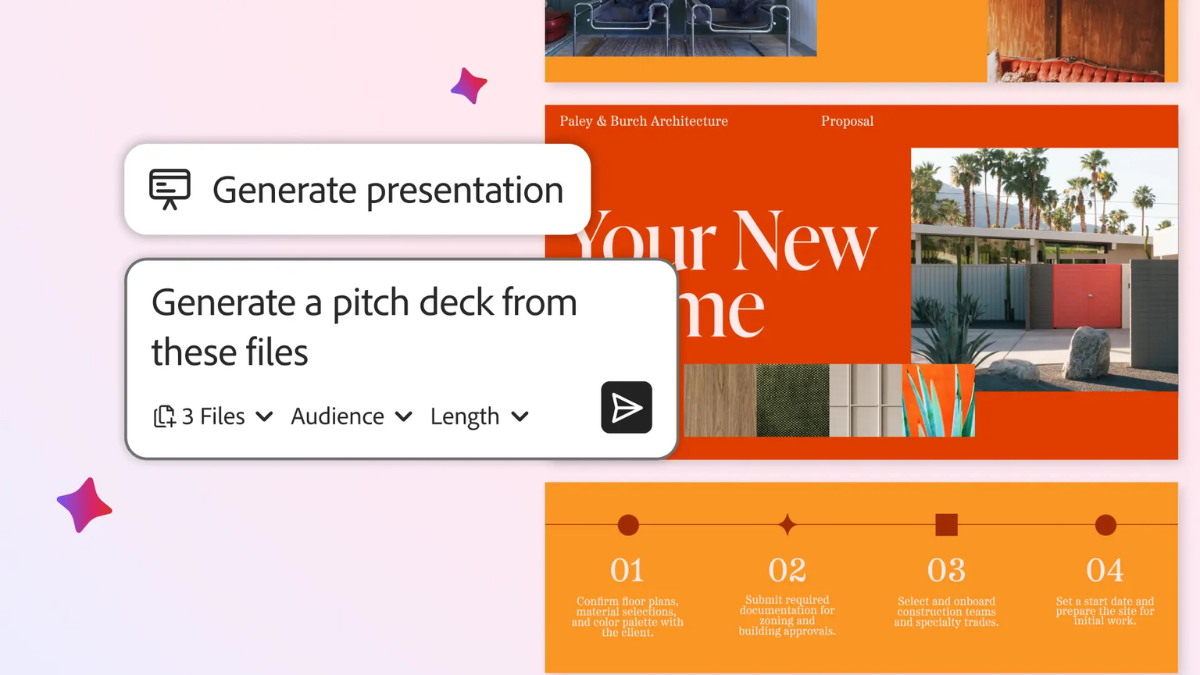
Photo Credit: Adobe
Adobe Acrobat’s PDF Space now lets users invite others for collaboration on projects
Click Here to Add Gadgets360 As A Trusted Source


Advertisement
Adobe Acrobat is getting new artificial intelligence (AI) capabilities, owing to a deeper integration with Adobe Express, the company's cloud-based content creation platform. One of the biggest highlights is the improvement to the AI chatbot in Acrobat, which can now edit PDFs based on natural language prompts. Additionally, the content creation platform's capabilities also allow Acrobat to generate presentations and audio podcasts using information from documents. The collaboration mode in PDF Space has also been improved. Adobe said that all of these features will also be available in Acrobat Studio.
Adobe Acrobat Gets New AI Features
In a blog post, the software giant announced and detailed the new capabilities that are now rolling out to Acrobat users globally. The Generate Presentation feature uses AI to analyse the content of one or more PDFs and automatically build an editable slide deck that reflects the key information. Users can tailor the presentation's tone and length, and refine slide layouts, images and text using tools from Adobe Express once the initial draft is created.
Another notable addition is Generate Podcast, which uses AI to turn text-heavy documents, reports, meeting transcripts or collections of related files into an audio summary. This audio output is personalised and can be adjusted in format and focus, making it easier for users to absorb detailed information by listening, whether during a commute or away from a screen. Interestingly, the feature appears to be similar to Google's audio overviews available in Gemini and NotebookLM.
The update also expands AI Assistant chat capabilities inside Acrobat Studio. Users can now interact with their PDFs using natural language prompts to perform editing tasks, such as removing pages, modifying text or images, adding digital signatures, applying passwords, and more, without manually performing these actions. The chat interface also offers guided help and troubleshooting for users who are unsure about how to execute specific PDF tasks.
Acrobat Studio also provides improved collaboration features within PDF Spaces, the platform's shared workspace environment. Teams can invite others to contribute files, leave notes or discuss project content in a central space where documents, links and web pages are organised together. The AI assistant embedded in PDF Spaces can answer questions about the content, surface insights, and synthesise information from multiple sources, helping groups align more quickly on decisions and next steps.
Comments
Get your daily dose of tech news, reviews, and insights, in under 80 characters on Gadgets 360 Turbo. Connect with fellow tech lovers on our Forum. Follow us on X, Facebook, WhatsApp, Threads and Google News for instant updates. Catch all the action on our YouTube channel.
Related Stories






Advertisement
Follow Us




-
05:05
Goboult Mustang Racer Smartwatch Review: Should You Get This Mustang Smartwatch? -
04:58
OnePlus Nord Buds 4 Pro Review: Specs, Sound Quality, ANC, and Battery Backup Tested -
02:29
[Sponsored] Samsung Galaxy S26 Ultra First Look: AI Smartphone for Creators, Gaming & Productivity -
04:25
Vivo X200T Review - Full Camera, Gaming & Battery Test | Worth Buying? -
28:31
The Future of Productivity: Logitech's Anatoliy Polyanker On AI, Hybrid Work, And India's Tech Boom
-
200 मेगापिक्सल कैमरा, 7000mAh बैटरी के साथ Vivo V70 FE लॉन्च, जानें सबकुछ
-
Redmi Note 15 SE भारत में लेटेस्ट AI फीचर्स, 5800mAh बैटरी के साथ लॉन्च
-
5100mAh बैटरी, 50MP कैमरा वाला Pixel फोन हुआ 4700 रुपये सस्ता
-
Ola की इलेक्ट्रिक मोटरसाइकिल Roadster X+ पर भारी डिस्काउंट, प्राइस में हुई 60,000 रुपये की कमी
-
ईरान और रूस में ड्रोन खरीदने के लिए हो रहा क्रिप्टोकरेंसी का इस्तेमाल
Advertisement
Popular on Gadgets
- Samsung Galaxy Unpacked 2026
- iPhone 17 Pro Max
- ChatGPT
- iOS 26
- Laptop Under 50000
- Smartwatch Under 10000
- Apple Vision Pro
- Oneplus 12
- OnePlus Nord CE 3 Lite 5G
- iPhone 13
- Xiaomi 14 Pro
- Oppo Find N3
- Tecno Spark Go (2023)
- Realme V30
- Best Phones Under 25000
- Samsung Galaxy S24 Series
- Cryptocurrency
- iQoo 12
- Samsung Galaxy S24 Ultra
- Giottus
- Samsung Galaxy Z Flip 5
- Apple 'Scary Fast'
- Housefull 5
- GoPro Hero 12 Black Review
- Invincible Season 2
- JioGlass
- HD Ready TV
- Latest Mobile Phones
- Compare Phones
Latest Gadgets
- Honor Play 80
- Nord 6
- Honor X80i
- Honor Play 80 Pro
- Redmi Note 15 SE 5G
- Redmi A7 Pro
- OPPO K15 Pro
- OPPO K15 Pro+
- Xiaomi Book Pro 14
- MacBook Neo
- Vivo Pad 6 Pro
- Lenovo Legion Y700 Gen 5
- boAt Valour Watch 1R
- Xiaomi Watch S5
- Xiaomi QLED TV X Pro 75
- Haier H5E Series
- Asus ROG Ally
- Nintendo Switch Lite
- Haier 1.6 Ton 5 Star Inverter Split AC (HSU19G-MZAID5BN-INV)
- Haier 1.6 Ton 5 Star Inverter Split AC (HSU19G-MZAIM5BN-INV)

- About Us
- Sitemaps
- Feedback
- Archives
- Contact Us
- RSS
- Advertise
- Career
- Privacy Policy
- Ethics
- Editorial Policy
- Terms & Conditions
- Complaint Redressal
Download Our Apps
Available in Hindi
© Copyright Red Pixels Ventures Limited 2026. All rights reserved.