-
 Instagram First Draft Launched With the Ability to Automatically Trim Clips for Reels26 August 2026
 -
Instagram Now Lets Users Swap Music on Published Feed Posts and Carousels22 July 2026
-
Instagram Lets Users Reorder Their Profile Grid With New Customisation Feature9 June 2026
-
Instagram Instants Explained: What It Is, How It Works, Features and More18 May 2026
-
Instagram's Edits App Turns One: How Meta Evolved Its Free Video Editing App and What's Next22 April 2026
- Home
- Apps
- Apps Features
- Year Ender 2025: Instagram Features Launched This Year, Including ‘Your Algorithm’, Watch History and More
Year Ender 2025: Instagram Features Launched This Year, Including ‘Your Algorithm’, Watch History and More
Instagram, the photo and video sharing platform, recently hit the milestone of three billion monthly active users.
Written by Dhruv Raghav, Edited by Manas Mitul | Updated: 26 December 2025 19:20 IST

Photo Credit: Unsplash/ Eyestetix Studio
Here are all the significant features that were introduced by Instagram in 2025.
Click Here to Add Gadgets360 As A Trusted Source

Advertisement
Instagram, the Meta-owned photos and videos sharing platform, had a relatively successful 2025. The social media giant recently achieved the milestone of three billion monthly active users. Instagram announced that its growth was primarily driven by messaging, Reels, and recommendations. Hence, the platform's recent updates have focussed on these particular features.
Instagram CEO Adam Mosseri, in a post, highlighted that the company had been working to better organise content on its platform. As the outgoing year nears its end, it is the best time to look at the new features Instagram introduced in 2025.
Here are the most significant updates that were rolled out for the Instagram mobile app in 2025, including customisable algorithms, the ability to view one's history, a new reposts section, and the Instagram Map feature.
Instagram's 'Your Algorithm' Tool:
Instagram introduced the new ‘Your Algorithm' tool in December to its mobile app. The feature is claimed to provide users greater control over what they are recommended on the photo and video sharing app. The new AI-powered tool also helps Instagram in displaying personalised content more efficiently. Currently, the ‘Your Algorithm' tool is available in the Reels tab only. However, the Meta-owned platform plans to bring it to other sections of the app, including the Explore tab. Moreover, the company is planning a wider rollout of the feature outside the US.

Instagram Watch History Feature:
You can now view your previously watched content on Instagram, owing to the introduction of the new Watch History feature. Brought to the platform earlier this year, in October, the feature appears in the menu of Instagram's mobile app. To access it, users can click on the three-line menu in the top-right corner of the screen, tap on Settings. Then, navigate to the Your Activity section, and click on Watch History. The app will display all the Reels that you recently watched, whether you liked or commented on them or not.
Instagram's New Reposts Tab:
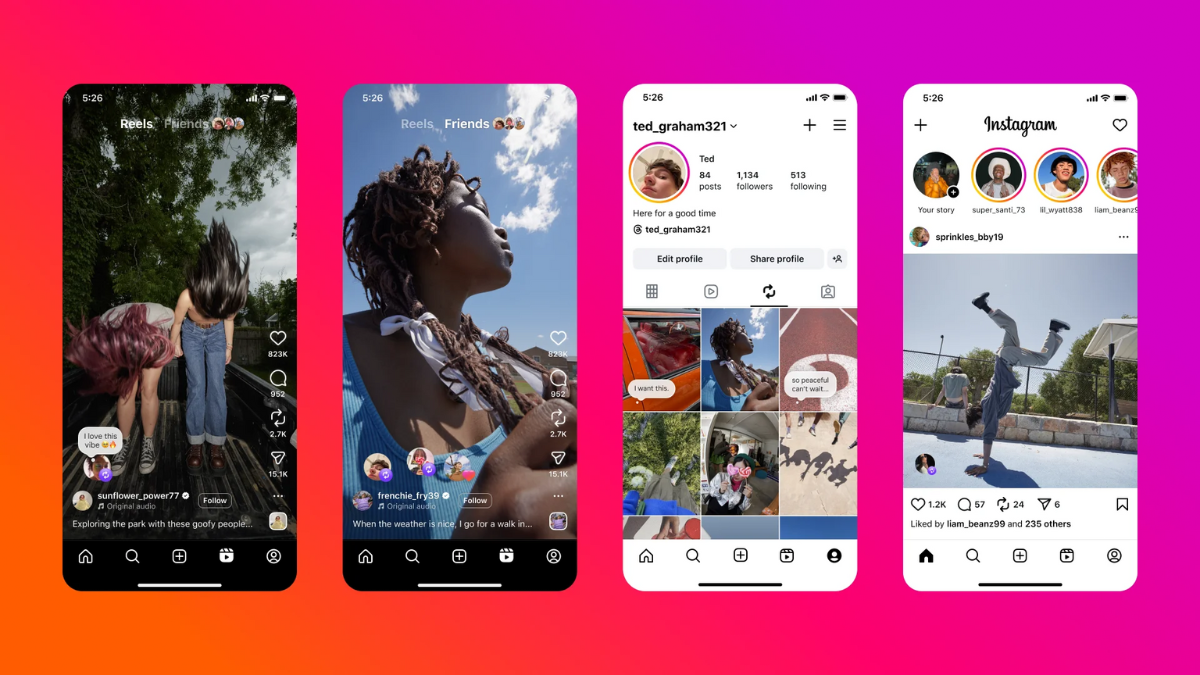
In August, Instagram announced a number of new updates for its mobile app, including a dedicated Reposts tab. While this might appear to be a mere cosmetic change, it is much more than that. Users can now repost posts, which are then recommended to others. Other users who follow you can see the posts you have reposted, represented by a small repost icon in the bottom left corner of the screen. Moreover, the dedicated Repost tab appears on a user's profile, which lists all the posts that have been previously reposted by them.
Instagram Map With Location Sharing:
Instagram recently added the ability to share one's location on the app with the new Instagram Map tool. Introduced alongside the Reports tab, the feature appears to be inspired by Snapchat's location-sharing tool. The photo and video sharing platform's Map section allows users to enable their last active location, which can be viewed by their friends. Users can also add or remove users who can see their last active location on the Instagram Map. It also displays content others are posting from different locations, too. However, the feature is disabled by default, and users have to voluntarily provide access to the same.
Instagram Allows Message Scheduling:
Another significant upgrade Instagram received this year was the message scheduling feature. Users can now schedule messages for a later time, if the do not wish to send a message immediately. Moreover, it lets users schedule reminders for the same. To access it, users need to press and hold the send button to select the time and date for the message to be scheduled. Then, they can hit the send button, and the receiver will get the message at the selected time.
Instagram Profile Cards:
The year 2025 also saw the introduction of Instagram Profile Cards. The new option lets users share personalised and animated digital cards with others. It features a QR Code, which can be scanned to directly visit your profile. The card also allows users to add a bio, presenting information about you in brief, along with links to pages and music. It gets an editable background. You can also add an image of yourself and a custom emoji to the Profile Card.

Other Notable Instagram Updates:
While we have covered the most significant Instagram features rolled out in 2025 above, there are a few more notable ones that should also be mentioned. For example, the mobile app got the long-awaited grid overhaul, allowing users to see posts in 3:4 tiles, instead of the conventional 1:1 grids. While it reduces the number of posts users can view on a user's profile, the visual change lets people clearly see the thumbnails. Moreover, Instagram increased the length of the Reels that can be posted on the platform, taking the same to 20 mins.
Further, Instagram got an expanded carousel this year. This particular feature lets users post up to 20 photos and videos at once, doubling the limit from a mere 10 photos and videos. The content is posted as part of a single post, letting users swipe and see it individually. Lastly, 2025 saw Instagram receiving the Trail Reels upgrade, which allows creators to post Reels only for the people who do not follow them to gauge their reaction before it is made live for their followers.
Comments
Get your daily dose of tech news, reviews, and insights, in under 80 characters on Gadgets 360 Turbo. Connect with fellow tech lovers on our Forum. Follow us on X, Facebook, WhatsApp, Threads and Google News for instant updates. Catch all the action on our YouTube channel.
Further reading:
Instagram Features, Instagram 2025 features, Instagram Maps, Instagram Message Scheduling, Instagram
Related Stories



Year Ender 2025: Instagram Features Launched This Year, Including ‘Your Algorithm’, Watch History and More


Advertisement
Follow Us




-
00:21
[Sponsored] Samsung Galaxy Z Fold8, Fold8 Ultra -
03:41
[Sponsored] Samsung Galaxy Z Fold8: How It Fits Into an Actor’s Busy Day | Camera, Multitasking & More -
09:53
iPhone 18 Goes On Sale In India: Huge Crowds, Long Queues At Apple Stores -
06:32
Google Pixel 11 Pro XL Review: The Most Exciting Pixel Yet? | 120X Zoom + Tensor G6 -
05:20
Samsung Galaxy Watch Ultra 2 Review: Is This the Best Android Smartwatch?
Advertisement
Popular on Gadgets
- Samsung Galaxy S26 Ultra
- Motorola Razr Fold
- ChatGPT
- OPPO Find N6
- Mobiles Under Rs. 40,000
- Vivo X300 Ultra
- Asus Zenbook S14
- iQOO 15
- Vivo X300 Pro
- Lenovo Yoga Slim 7i Aura Edition
- iQOO 15R
- Vivo X Fold 5
- Sony PlayStation 5
- HP OmniPad 12
- OnePlus Nord CE 6 Lite
- OnePlus Pad 4
- OPPO F33 Pro 5G
- Cryptocurrency
- HP OmniBook Ultra 14 (2026)
- iPhone 17
- Eureka Forbes AP 355 Room Air Purifier
- Latest Mobile Phones
- Compare Phones
Latest Gadgets
- Vivo Y600i
- Mivi One 5G
- Xiaomi 18 Pro Max
- Motorola Signature 27
- OPPO Find X10 E
- OnePlus N6 Lite 4G
- Ai+ Nova 2 Power 5G
- Lava Virat Curve 5G
- Microsoft Surface Laptop, 13-inch (2nd Edition)
- Lenovo LOQ 15AHP11
- Microsoft Surface Pro, 12-inch (2nd Edition)
- Xiaomi Pad 9 Pro
- Amazfit T-Rex Dual Solar
- OPPO Watch S2
- Haier M70 Mini LED 65-inch
- Xiaomi TV FX Mini LED 65
- Acer Predator Atlas 8
- Asus ROG Ally
- Blue Star 1.5 Ton 5 Star Inverter Split AC (IE518ZNURS)
- Blue Star 2 Ton 3 Star Inverter Window AC (WIE324L)

- About Us
- Sitemaps
- Feedback
- Archives
- Contact Us
- RSS
- Advertise
- Career
- Privacy Policy
- Ethics
- Editorial Policy
- Terms & Conditions
- Complaint Redressal
Download Our Apps
Available in Hindi
© Copyright Red Pixels Ventures Limited 2026. All rights reserved.