-
 How to Set Up a Parent-Managed Account on WhatsApp: A Step-by-Step Guide12 March 2026
 -
WhatsApp Introduces Device Linkage Warning as Meta Expands Anti-Fraud Tools Across Facebook, Messenger12 March 2026
-
WhatsApp Adds Support for Parent-Managed Accounts With Stricter Controls for Children Under 1311 March 2026
-
Six Upcoming WhatsApp Features That Could Soon Roll Out on iOS, Android9 March 2026
-
WhatsApp Update Introduces Support for Discovering Stickers While Typing Emoji: How It Works6 March 2026
WhatsApp Prepares to Expand Ads on Status and Channels to More Users
WhatsApp has informed users that personal messages, calls, and statuses will remain end-to-end encrypted.
Written by Nithya P Nair, Edited by David Delima | Updated: 10 December 2025 14:51 IST
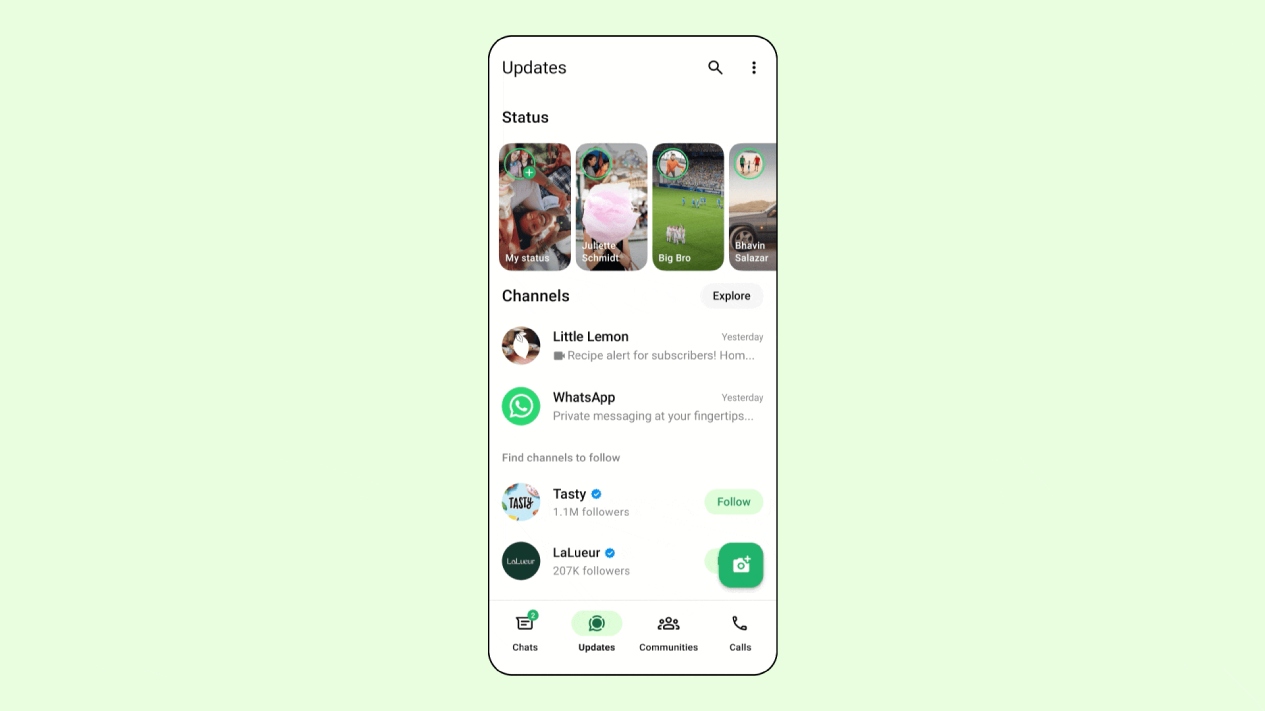
Photo Credit: WhatsApp
Many users on X and other social platforms report that they have begun spotting ads on WhatsApp
Click Here to Add Gadgets360 As A Trusted Source

Advertisement
WhatsApp will soon show ads to more users while using channels and viewing other users' Status updates. Users have started spotting ads on WhatsApp, but these promotions do not appear in private chats. Instead, they are limited to the Updates tab. Meta confirmed its plans to introduce ads in WhatsApp Status updates back in June this. These advertisements will help users discover businesses and start communicating with them directly about the products or services. Users will have the option to view the advertiser's profile, report or hide the ad, and access more details with this new update.
WhatsApp Informs Users About Ads in Channels and Status
The messaging platform has begun to show some WhatsApp users a popup message informing them that they will begin seeing advertisements on the app. The messaging service has assured that personal messages, calls, and statuses will remain end-to-end encrypted and will not be used to show ads. They will be shown only in the Status and Channels sections, according to the company. The popup message was also shown to a Gadgets 360 staff member on Wednesday.
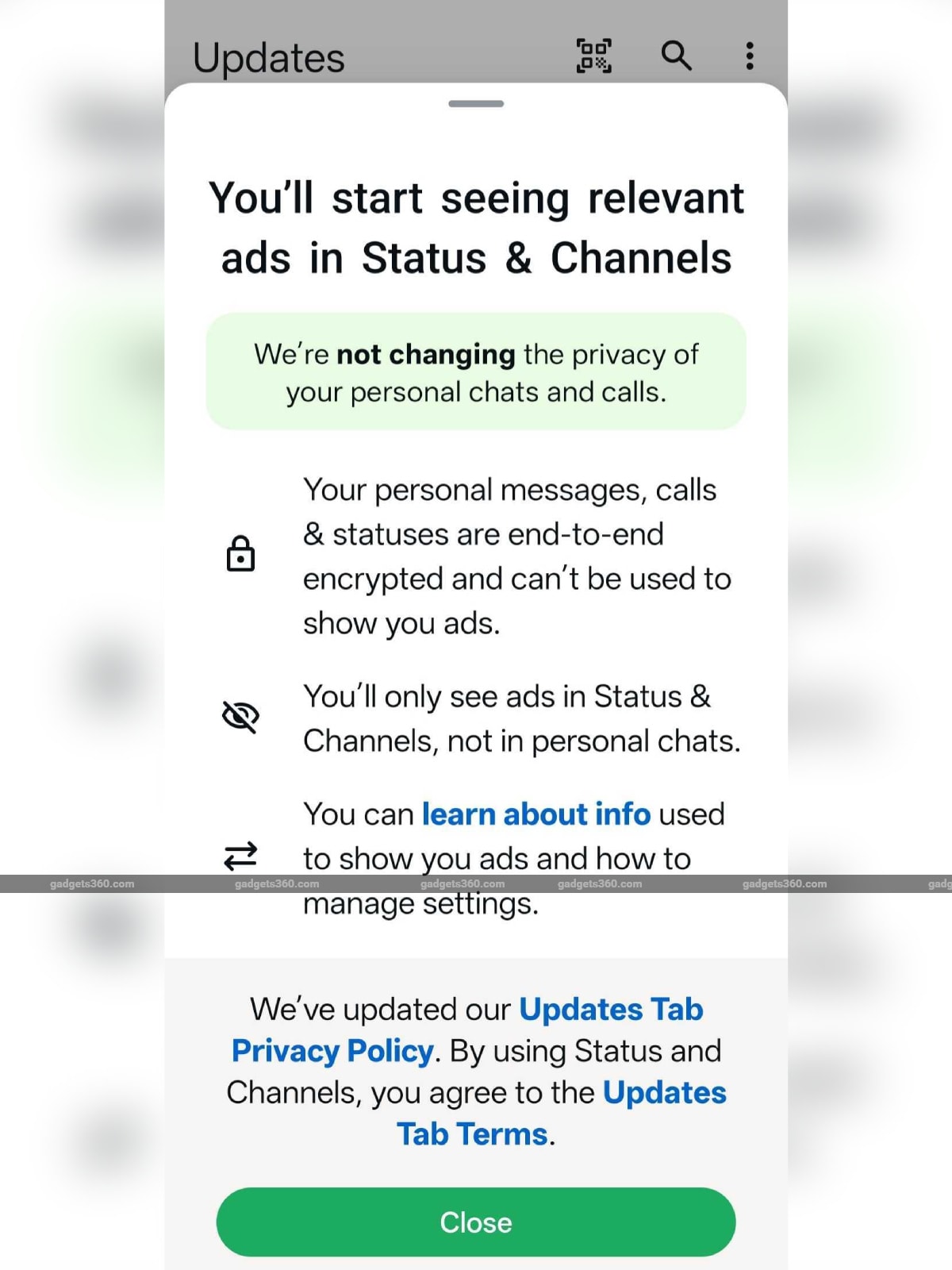
WhatsApp's popup message informing users about ads in the app
Many users on X and other social platforms report that they have begun spotting ads on WhatsApp. Though it is not clear if this is a full global launch. With the latest update, users can find new businesses and start conversations with them about a product or service they're promoting in Status. By tapping the three-dot menu or More options on an ad, users can see the advertiser's profile, hide or report the ad.
WhatsApp says that the ads will be shown to users based on a few details, such as their country or city, device language, Channels they follow, content they engage with in channels, and ads they've clicked on in Channels or Status.
WhatsApp claims that it does not use personal messages, calls, and location shared in chats to personalise ads. The company also reiterates that it does not use information, including device contacts and membership in groups with friends and family, to show ads.
You can manage your ad preferences by heading to Settings > Accounts Centre >Accounts settings section> Ad preferences.
If you want to hide a specific channel ad, you can tap the Sponsored button on the promoted Channel and selecting Hide ad. The Status ad can be hidden by heading to More Options (three vertical dots)> Hide ad.
WhatsApp announced the addition of ads to the Status screen in June this year. It is part of Meta's push to monetise the platform. Other Meta-owned platforms like Facebook and Instagram already display ads inside their apps and on their websites.
Comments
Get your daily dose of tech news, reviews, and insights, in under 80 characters on Gadgets 360 Turbo. Connect with fellow tech lovers on our Forum. Follow us on X, Facebook, WhatsApp, Threads and Google News for instant updates. Catch all the action on our YouTube channel.
Further reading:
WhatsApp, WhatsApp Ads, WhatsApp Update, WhatsApp Features, WhatsApp Status, WhatsApp Channels, Meta
Related Stories





Advertisement
Follow Us




-

04:54
Redmi Note 15 Review: Features, Specifications, Pros, Cons, And Everything Else -
04:38
Realme 16 Pro Review | Camera, Performance & Battery Test | Best Mid-Range Phone? -
02:14
Inside Amazon's Big AI Play at AI Impact Summit 2026 -
00:34
[Sponsored] Why Startup Founders Are Choosing AI Laptops? -
00:30
[Sponsored] Why Galaxy Tab S10 FE Is the Perfect Tablet for Students?
Advertisement
Popular on Gadgets
- Samsung Galaxy Unpacked 2026
- iPhone 17 Pro Max
- ChatGPT
- iOS 26
- Laptop Under 50000
- Smartwatch Under 10000
- Apple Vision Pro
- Oneplus 12
- OnePlus Nord CE 3 Lite 5G
- iPhone 13
- Xiaomi 14 Pro
- Oppo Find N3
- Tecno Spark Go (2023)
- Realme V30
- Best Phones Under 25000
- Samsung Galaxy S24 Series
- Cryptocurrency
- iQoo 12
- Samsung Galaxy S24 Ultra
- Giottus
- Samsung Galaxy Z Flip 5
- Apple 'Scary Fast'
- Housefull 5
- GoPro Hero 12 Black Review
- Invincible Season 2
- JioGlass
- HD Ready TV
- Latest Mobile Phones
- Compare Phones
Latest Gadgets
- Motorola Edge 70 Fusion+
- iQOO Z11x 5G
- Vivo Y51 Pro 5G
- Itel Zeno 100
- Poco C85x 5G
- Realme Note 80
- Vivo V70 FE
- Realme C83 5G
- MacBook Neo
- MacBook Pro 16-Inch (M5 Max, 2026)
- Tecno Megapad 2
- Apple iPad Air 13-Inch (2026) Wi-Fi + Cellular
- Tecno Watch GT 1S
- Huawei Watch GT Runner 2
- Xiaomi QLED TV X Pro 75
- Haier H5E Series
- Asus ROG Ally
- Nintendo Switch Lite
- Haier 1.6 Ton 5 Star Inverter Split AC (HSU19G-MZAID5BN-INV)
- Haier 1.6 Ton 5 Star Inverter Split AC (HSU19G-MZAIM5BN-INV)

- About Us
- Sitemaps
- Feedback
- Archives
- Contact Us
- RSS
- Advertise
- Career
- Privacy Policy
- Ethics
- Editorial Policy
- Terms & Conditions
- Complaint Redressal
Download Our Apps
Available in Hindi
© Copyright Red Pixels Ventures Limited 2026. All rights reserved.