-
 Google’s Personal Intelligence Is Now Rolling Out to More Users18 March 2026
 -
Google Expands Gemini in Chrome to India With Support for 8 Indic Languages11 March 2026
-
How to use Gemini-Powered Auto Browse Feature on Google Chrome10 March 2026
-
Best Google Chrome Flags to Make Your Browser Faster14 February 2026
-
Google Chrome Brings Convenient Pinned Tabs Feature to Android Smartphone Owners13 February 2026
Google Chrome Updated With Split View, Built-In PDF Markup Tools, and More Features
Users can now view two tabs side by side within a single Chrome window, using the new Split View feature.
Written by Shaurya Tomer, Edited by Ketan Pratap | Updated: 20 February 2026 12:41 IST
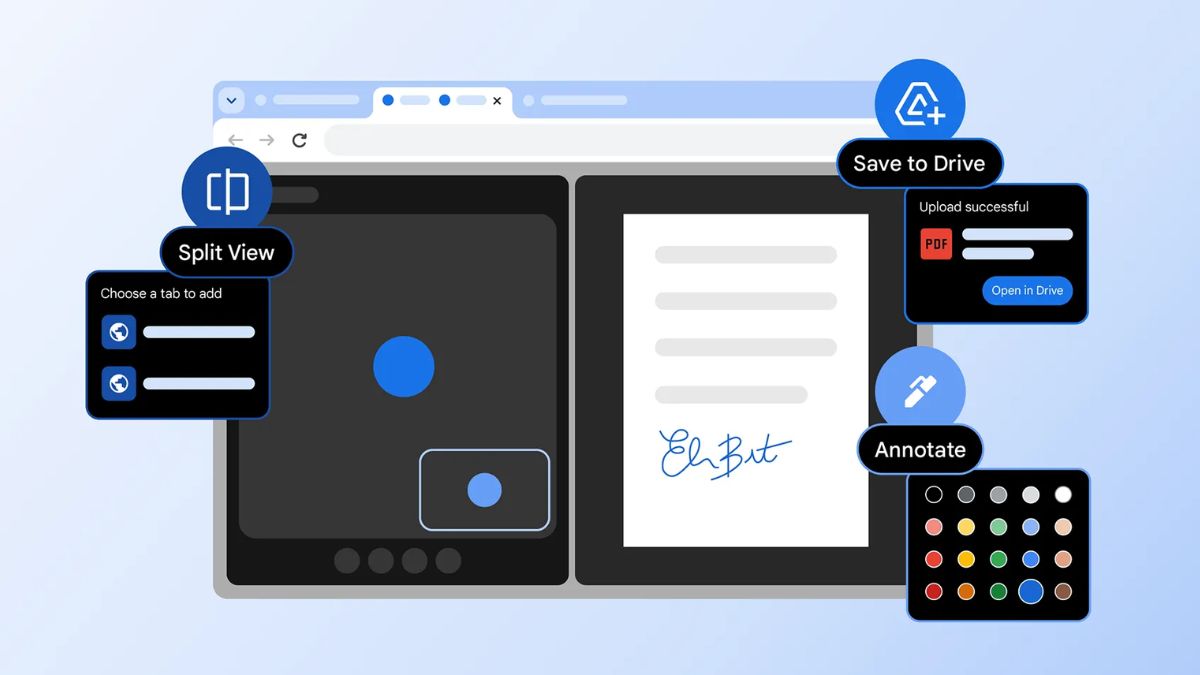
Photo Credit: Google
The new features are rolling out to Google Chrome for desktop users gradually
Click Here to Add Gadgets360 As A Trusted Source

Advertisement
Google announced a new set of productivity-focused improvements for the Google Chrome browser on Thursday. The Mountain View-based tech giant says the new additions are aimed at helping everyday and enterprise users manage tabs more efficiently and complete tasks faster. Among the updates is a new tab organisation tool called Split View, which displays two tabs at the same time. Chrome is also getting the annotation capability, allowing users to highlight text and add notes to a PDF.
New Features on Google Chrome
The first notable addition to Google Chrome is Split View. As the name suggests, it allows users to view two tabs side by side within a single Chrome window. Instead of manually resizing separate browser windows, they can right-click on a tab and select the Split View option to pair it with another open tab. The browser will then automatically arrange both pages evenly across the screen, Google explained in a blog post.
Time to work smarter with our new features designed to help you make the most of your time & energy!
— Chrome (@googlechrome) February 19, 2026
Leave yourself notes with PDF Annotations. 🖊️
Open pages side-by-side in one tab with split view. 🖥️🖥️
Stay organized by saving PDFs directly to Google Drive right from Chrome.… pic.twitter.com/gLB7Pwdy8I
As per the company, Split View is intended to make it easier to compare documents and reference notes while drafting content, or work across multiple web apps simultaneously without having to manually resize windows.
This feature has been in testing for the past couple of months, and Gadgets 360 staff members were able to access it before the official announcement.
Google has also updated Chrome's built-in PDF viewer with annotation capability. Consequently, users can highlight text, add comments, and mark up PDF documents. The tech giant says users will now see annotation toolbar when opening a PDF in the browser, allowing them to highlight text, draw, add comments, or make basic markups without downloading the file.
The third addition is a Save to Google Drive feature. By its very definition, it enables users to quickly store files and PDFs to their Drive account from within Google Chrome. They can save content directly to the cloud with a few clicks, without having to download files locally and upload them separately.
As per the company, the file is uploaded to the user's linked Google Drive account, where it can be accessed across devices in a separate Save from Chrome folder, streamlining cloud-based workflows and reducing local storage usage.
Google says the features are rolling out in the latest Chrome version on desktop platforms. Such features are part of a phased rollout and may take some time to reach all users.
Comments
Get your daily dose of tech news, reviews, and insights, in under 80 characters on Gadgets 360 Turbo. Connect with fellow tech lovers on our Forum. Follow us on X, Facebook, WhatsApp, Threads and Google News for instant updates. Catch all the action on our YouTube channel.
Related Stories



Advertisement
Follow Us




-

05:05
Goboult Mustang Racer Smartwatch Review: Should You Get This Mustang Smartwatch? -
04:58
OnePlus Nord Buds 4 Pro Review: Specs, Sound Quality, ANC, and Battery Backup Tested -
02:29
[Sponsored] Samsung Galaxy S26 Ultra First Look: AI Smartphone for Creators, Gaming & Productivity -
04:25
Vivo X200T Review - Full Camera, Gaming & Battery Test | Worth Buying? -
28:31
The Future of Productivity: Logitech's Anatoliy Polyanker On AI, Hybrid Work, And India's Tech Boom
Advertisement
Popular on Gadgets
- Samsung Galaxy Unpacked 2026
- iPhone 17 Pro Max
- ChatGPT
- iOS 26
- Laptop Under 50000
- Smartwatch Under 10000
- Apple Vision Pro
- Oneplus 12
- OnePlus Nord CE 3 Lite 5G
- iPhone 13
- Xiaomi 14 Pro
- Oppo Find N3
- Tecno Spark Go (2023)
- Realme V30
- Best Phones Under 25000
- Samsung Galaxy S24 Series
- Cryptocurrency
- iQoo 12
- Samsung Galaxy S24 Ultra
- Giottus
- Samsung Galaxy Z Flip 5
- Apple 'Scary Fast'
- Housefull 5
- GoPro Hero 12 Black Review
- Invincible Season 2
- JioGlass
- HD Ready TV
- Latest Mobile Phones
- Compare Phones
Latest Gadgets
- Honor Play 80
- Nord 6
- Honor X80i
- Honor Play 80 Pro
- Redmi Note 15 SE 5G
- Redmi A7 Pro
- OPPO K15 Pro
- OPPO K15 Pro+
- Xiaomi Book Pro 14
- MacBook Neo
- Vivo Pad 6 Pro
- Lenovo Legion Y700 Gen 5
- boAt Valour Watch 1R
- Xiaomi Watch S5
- Xiaomi QLED TV X Pro 75
- Haier H5E Series
- Asus ROG Ally
- Nintendo Switch Lite
- Haier 1.6 Ton 5 Star Inverter Split AC (HSU19G-MZAID5BN-INV)
- Haier 1.6 Ton 5 Star Inverter Split AC (HSU19G-MZAIM5BN-INV)

- About Us
- Sitemaps
- Feedback
- Archives
- Contact Us
- RSS
- Advertise
- Career
- Privacy Policy
- Ethics
- Editorial Policy
- Terms & Conditions
- Complaint Redressal
Download Our Apps
Available in Hindi
© Copyright Red Pixels Ventures Limited 2026. All rights reserved.